Indie game storeFree gamesFun gamesHorror games
Game developmentAssetsComics
SalesBundles
Jobs
TagsGame Engines

Simpl_pseudocode

92
Posts
11
Topics
8
Followers
2
Following
A member registered Jun 20, 2017 · View creator page →

Creator of

Recent community posts

Here’s the simple ASCII demo game I promised you. You can start studying it now; the next release of SIMPL will include the fix for the bug I told you about, the one that keeps it from running at the right speed, which I’ve already fixed in my local working copy.

// ============================================================
//  STAR CATCHER - a tiny game made of ASCII characters
// ============================================================
//  Stars fall from the sky: catch them with your basket \_/.
//  Left and Right move the basket. Miss three stars and the
//  game is over.
//
//  HOW IT WORKS
//  The window is divided into a grid of square cells, like a
//  sheet of squared paper: 20 columns and 16 rows. Each cell
//  holds at most one ASCII character: a star is a "+", the
//  basket is "\", "_" and "/" in three cells side by side, the
//  ground is a row of "=".
//
//  The game remembers only WHERE things are, as a row and a
//  column of the grid (StarRow, StarCol, BasketCol). Many times
//  a second it does the same three things, the GAME LOOP:
//    1. Input:  read the keys, and move the basket.
//    2. Update: move the star, check whether it was caught.
//    3. Draw:   clear the window and draw every character
//               in its cell, then show the result.
//  Moving a character from one cell to the next and drawing
//  everything again is all there is to an animation: like the
//  pages of a flip book, each frame is a little different from
//  the one before.
// ============================================================

// ---------- The grid ----------

// The size of the grid, in cells, and of one cell, in pixels
CONSTANT Cols = 20
CONSTANT Rows = 14
CONSTANT Cell = 24

// ---------- What the game remembers ----------

DECLARE Screen : Canvas
// Where things are: a row from 1 (top) to Rows, a column from 1
// (left) to Cols. The basket is always on the last row, so only
// its column changes, and BasketCol is the column of its "\".
DECLARE BasketCol, StarRow, StarCol : INTEGER
DECLARE Score, Lives : INTEGER
// The clock of the falling star (see step 2 of the loop)
DECLARE FallTimer, FallInterval, LastTime, Now : REAL
// Which of its two shapes the star has now: it twinkles
DECLARE Twinkle : BOOLEAN
DECLARE Col : INTEGER

// ---------- Two procedures ----------

// Draws Text in the cell at Row and Col of the grid. This is the
// only place that turns cells into pixels: column 1 starts at
// x = 0, column 2 at x = Cell, and so on (4 more pixels move the
// character towards the middle of its cell). Everywhere else the
// program thinks in rows and columns, not in pixels.
PROCEDURE Put(Text : STRING, Row : INTEGER, Col : INTEGER)
    CALL Screen.DrawText(Text, (Col - 1) * Cell + 4, (Row - 1) * Cell, Cell)
ENDPROCEDURE

// A new star at the top row, in a random column from 1 to Cols
PROCEDURE NewStar()
    StarRow ← 1
    StarCol ← INT(RAND(Cols)) + 1
ENDPROCEDURE

// ---------- Getting ready ----------

// The window: as wide as the grid, and two rows taller than the
// sky, for the ground and the score
Screen ← NEW Canvas(Cols * Cell, (Rows + 2) * Cell)
CALL Screen.SetBackground(10, 10, 30)
BasketCol ← Cols DIV 2
Score ← 0
Lives ← 3
// The star falls one cell every 0.25 seconds at the start
FallInterval ← 0.25
FallTimer ← 0
LastTime ← TIME()
CALL NewStar()

// ---------- The game loop ----------

WHILE Lives > 0 AND NOT Screen.ShouldQuit()

    // 1. INPUT
    // KeyPressed is TRUE only in the frame in which the key goes
    // down, so each press moves the basket by exactly one cell.
    // The basket can't leave the grid: its "\" stays from column
    // 1 to column Cols - 2, so that its "/" is still inside.
    IF Screen.KeyPressed("Left") AND BasketCol > 1 THEN
        BasketCol ← BasketCol - 1
    ENDIF
    IF Screen.KeyPressed("Right") AND BasketCol < Cols - 2 THEN
        BasketCol ← BasketCol + 1
    ENDIF

    // 2. UPDATE
    // The loop goes round about 50 times a second, faster or
    // slower depending on the computer. To make the star fall at
    // the same speed everywhere, the program measures time with
    // TIME() (seconds since the program started): FallTimer adds
    // up the time that has passed, and each time it reaches
    // FallInterval the star moves down one cell.
    Now ← TIME()
    FallTimer ← FallTimer + (Now - LastTime)
    LastTime ← Now
    IF FallTimer >= FallInterval THEN
        FallTimer ← FallTimer - FallInterval
        StarRow ← StarRow + 1
        // A different shape at each step: the star twinkles
        Twinkle ← NOT Twinkle
        IF StarRow = Rows THEN
            // The star has reached the basket's row. The basket
            // fills three cells, from BasketCol to BasketCol + 2:
            // the star is caught if its column is one of them.
            IF StarCol >= BasketCol AND StarCol <= BasketCol + 2 THEN
                Score ← Score + 1
                // Each star caught makes the next ones a little
                // faster, down to 0.08 seconds per cell
                FallInterval ← MAX(0.08, FallInterval - 0.01)
            ELSE
                Lives ← Lives - 1
            ENDIF
            CALL NewStar()
        ENDIF
    ENDIF

    // 3. DRAW
    // Clear wipes the whole window with the background color, and
    // everything is drawn again where it is now. Nothing has to
    // be "rubbed out" from where it was before.
    CALL Screen.Clear()

    // The star, in yellow: "+" and "x" in turn, so it twinkles
    CALL Screen.SetColor(255, 230, 80)
    IF Twinkle THEN
        CALL Put("+", StarRow, StarCol)
    ELSE
        CALL Put("x", StarRow, StarCol)
    ENDIF

    // The basket, in light blue: one character in each of its
    // three cells, so it is exactly three cells wide, as the
    // test in step 2 expects
    CALL Screen.SetColor(120, 220, 255)
    CALL Put("\", Rows, BasketCol)
    CALL Put("_", Rows, BasketCol + 1)
    CALL Put("/", Rows, BasketCol + 2)

    // The ground, in green: an "=" in every cell of the row
    // under the basket
    CALL Screen.SetColor(90, 160, 90)
    FOR Col ← 1 TO Cols
        CALL Put("=", Rows + 1, Col)
    NEXT Col

    // The score, on the last row, in smaller characters
    CALL Screen.SetColor(230, 230, 240)
    CALL Screen.DrawText("Score " & STR(Score) & "    Lives " & STR(Lives), 8, (Rows + 1) * Cell + 4, 20)

    // Everything drawn so far appears in the window at once, so
    // the player never sees a half-drawn frame
    CALL Screen.Show()

    // A short pause before the next frame: it lets the computer
    // rest, and WAIT also reads the keys pressed in the meantime
    CALL WAIT(0.02)
ENDWHILE

// ---------- The end ----------

// The last frame stays on the screen for two seconds, with the
// game over in the middle of the sky
IF Lives = 0 THEN
    CALL Screen.SetColor(255, 90, 90)
    CALL Screen.DrawText("GAME OVER", 138, 130, 48)
    CALL Screen.Show()
    CALL WAIT(2)
ENDIF
OUTPUT "Game over! You caught ", Score, " stars."
CALL Screen.Close()
Thank you very much. I expect to publish the new release with the fix for the bug I mentioned in the next few days, along with the code for the ASCII game example made with the Canvas, which I will post here for you.

What you’re asking is theoretically already possible using SIMPL’s Canvas feature. I was putting together an example to post, but while doing so I discovered a hidden bug in the DrawText instruction that affects the final result. I’ll be fixing it in the next release and will share the example I mentioned for creating color ASCII games with the Canvas at the same time.

As a side note, since I see you appreciate SIMPL, could I kindly ask you to rate it 5 stars here on Itch and maybe give it a like on AlternativeTo.net? This would help give the project some visibility and help other people discover it. I’d really appreciate it.

SIMPL 1.3.3 is out, a free download for Windows and Linux. The standard library grows from six libraries to eight, with more than 110 new routines and eight new classes, and from now on an update of SIMPL brings the new copies of the libraries and programs with it. Hints now speak about your program, and a file the system refuses is explained in words.

Upgrading from 1.3.2? Three changes in the libraries can affect your programs: see Upgrading from 1.3.2 at the end.

Help others find SIMPL

SIMPL is made by one independent developer, with no company or advertising behind it: it grows when the people who find it useful tell others about it. If you enjoy SIMPL, whatever you use it for, here is how you can help others find it:

  • Rate it on itch.io: simpl-pseudocode.itch.io/simpl/rate. Five stars take ten seconds and help SIMPL show up where people look for tools. Made a game, solved a tricky problem, or just ran your first program? Add a review and tell the story: it’s what convinces the next person to hit Download.
  • Like it on AlternativeTo: SIMPL on AlternativeTo. A like takes one click; a detailed review helps people choose the right tool, and yours might be the one that tips them toward SIMPL.
  • Share the page with anyone it could help, or on social media: simpl-pseudocode.itch.io/simpl.

Thank you! And if something doesn’t work as it should, tell me on the community board.


A bigger toolbox

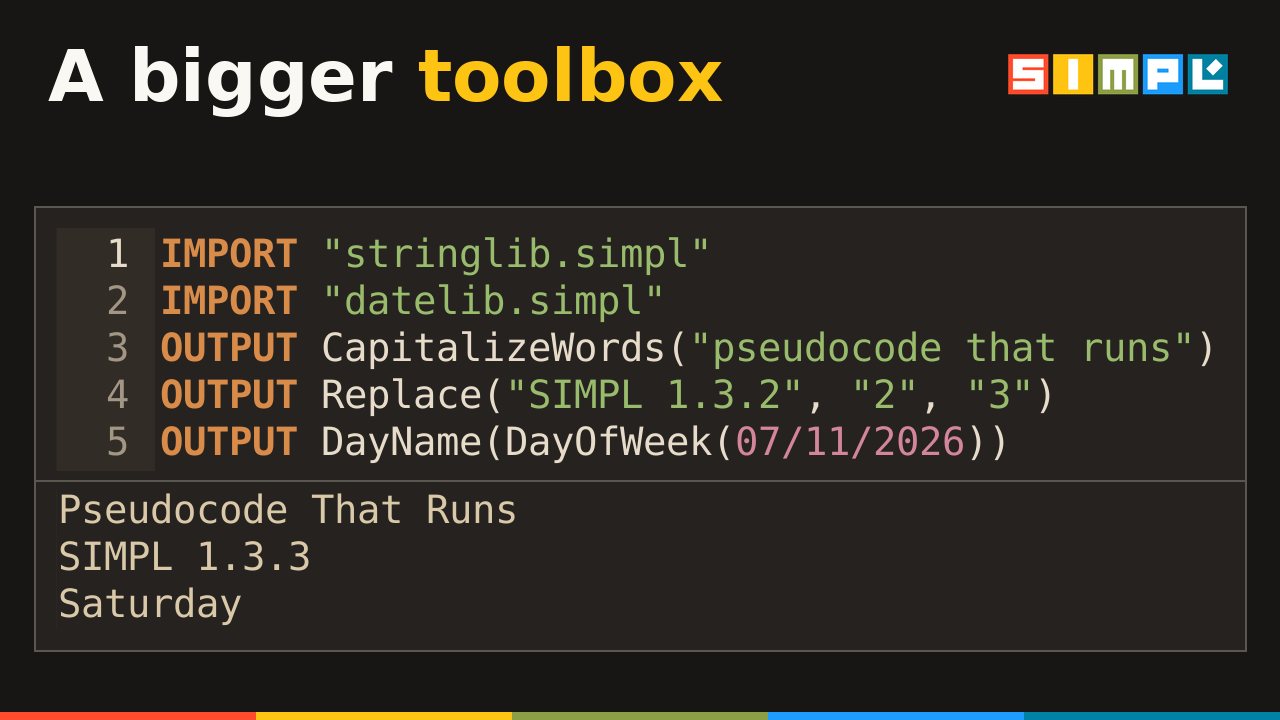
Splitting a sentence into words, sorting with four different algorithms, a median or a standard deviation, the day of the week of a date, a dictionary that counts words: what you used to write from scratch is now one IMPORT away. Each new routine does what the same function of Python does, and Appendix E of the manual describes each one with an example.

  • mathlib: rounding (Floor, Ceiling, Round, RoundTo), Sign, Clamp, even and odd numbers, square roots and perfect squares, digits, combinations and permutations, Fibonacci, Hypotenuse, Exp, trigonometry in radians and degrees, number bases from binary to hexadecimal, random numbers and dice. IsPrime is much faster on large numbers.
  • stringlib: searching (Find, FindLast, CountSubstring, StartsWith, EndsWith), replacing, padding and centering, trimming one side, CapitalizeWords, CaesarShift, tests on characters and words, and the procedures Split, SplitWords and Join.
  • arraylib: four more sorting algorithms (selection, insertion, merge and quick sort), IsSorted, Shuffle, inserting, removing, filling and rotating elements, the position of the largest and smallest, and the routines for arrays of REALs and of STRINGs.
  • iolib: reading and writing CSV lines, the format spreadsheets save.
  • structures: the classes StringStack and StringQueue, List and StringList, PriorityQueue, Dictionary, Tally (a Dictionary that counts) and BinaryTree, the tree of Chapter 22.
  • New statlib: median, mode, range, variance, standard deviation and percentiles.
  • New datelib: leap years, days in a month, the day of the year and of the week, days between two dates, the names of days and months.

The new names. A program of your own that defines one of these and IMPORTs their library stops at the IMPORT (see Compatibility). statlib IMPORTs arraylib, so a program that IMPORTs statlib has the names of arraylib too.

  • mathlib: ArcTan, Ceiling, Clamp, Combinations, Cos, CountDigits, Degrees, DigitSum, Exp, Fibonacci, Floor, FromBase, FromBinary, FromHex, Hypotenuse, IntegerSqrt, IsEven, IsOdd, IsPerfectSquare, Permutations, Radians, RandomInteger, RandomReal, RollDice, Round, RoundTo, Sign, Sin, Tan, ToBase, ToBinary, ToHex.
  • stringlib: CaesarShift, CapitalizeWords, Center, CountSubstring, CountWords, EndsWith, Find, FindLast, IsDigit, IsLetter, IsLower, IsUpper, IsWholeNumber, Join, PadLeft, PadRight, Replace, ReplaceFirst, Split, SplitWords, StartsWith, TrimLeft, TrimRight.
  • arraylib: AverageReals, BinarySearchReals, BinarySearchStrings, BubbleSortReals, BubbleSortStrings, FillArray, InsertAt, InsertionSort, IsSorted, LinearSearchReals, LinearSearchStrings, MaximumReals, MaximumStrings, MergeSort, MinimumReals, MinimumStrings, PositionOfMaximum, PositionOfMinimum, PrintArrayReals, PrintArrayStrings, QuickSort, QuickSortPart, RemoveAt, RotateArray, SelectionSort, Shuffle, ShuffleReals, ShuffleStrings, SumReals.
  • iolib: AppendCsvLine, JoinCsv, ReadCsvColumn, SplitCsv.
  • structures: BinaryTree, Dictionary, List, PriorityQueue, StringList, StringQueue, StringStack, Tally.
  • statlib: Median, Mode, Range, PopulationVariance, SampleVariance, PopulationStandardDeviation, SampleStandardDeviation, Percentile, and each of them with Reals at the end (MedianReals…).
  • datelib: DayName, DayNumber, DayOfWeek, DayOfYear, DaysBetween, DaysInMonth, IsLeapYear, IsWeekend, MonthName.

Hints about your program

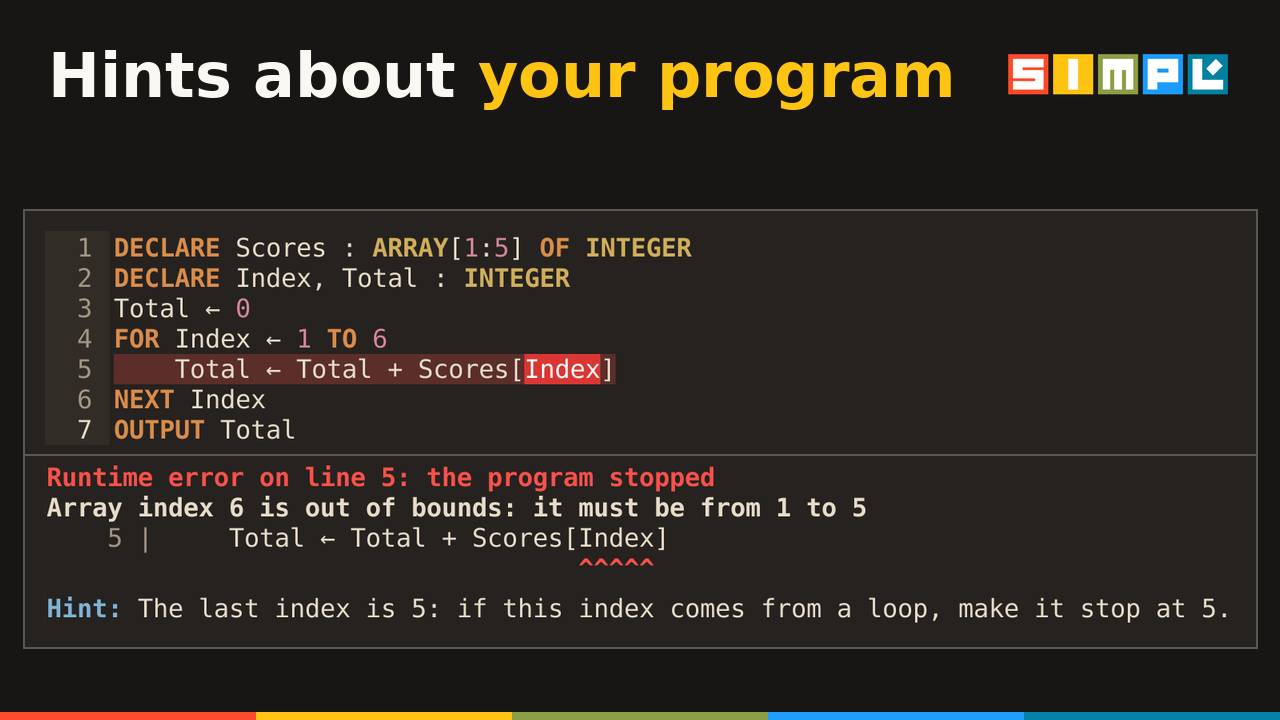
A hint now speaks about what your program shows, and following it to the letter leads to a program that works.

  • An index out of bounds written as a number: Write an index from 1 to 3 here. One step out: The last index is 5: if this index comes from a loop, make it stop at 5. Further out, the hint gives the value and asks where it comes from.
  • The wrong number of values in a call names the parameters: Power has 2 parameters, Base and Exponent: give one value for each, in this order. The same for a built-in function, LENGTH takes 1 value: LENGTH(S)., and for a method of the Canvas or of Sound.
  • A division by zero: by a 0 you wrote, write another number; by a variable, Count is 0 here, with the IF that checks it.
  • Text where a number goes: the hint depends on what the text holds, "13", "13.5" or "thirteen".
  • Values written by hand: a DATE or TRUE between quotes is shown without them; a DECLARE without its colon, and a whole group of elements assigned at once, get the line rewritten with your names; a pixel outside the Canvas gets the size of your Canvas.
  • A pointer or NULL stored or compared where a number goes has a hint of its own.

Files the system refuses

When the system refuses a file, SIMPL now explains why in plain words, with a hint, instead of the system’s own phrase (Permission denied).

  • The reasons: the system doesn’t allow it: the file may be read-only, or open in another program (a CSV open in Excel, on Windows), the disk is full, the disk can only be read, its name is too long.
  • A character Windows doesn’t allow in a name, such as "a?.png": its name has ‘?’, which a file name can’t have.
  • Everywhere a file is used: the file statements, saving a Canvas, IMPORT, and GU{I}DE’s Open, Save and Print.

The User Manual

The tables of the appendices are easier to read at a glance, some sections have clearer titles, and the e-book is updated with the manual.

  • Tables you can read at a glance. The tables of the appendices follow the same rules: what you look up first, the chapter last, the guide marked Yes or No, short examples, with the details below. Code in a table has the colors of code, and the tables of a section line up.
  • Clearer titles: Length and parts of a string, Worked example: counting coins with an array, Inserting a record: the guide’s example, Reading an address never written, Before and after the recursive call, Choosing the next piece: the 7-bag, Checking every move: IsValidPosition, How a line is run: the pipeline, and Part III — Beyond the Cambridge guide.
  • One name for each command: the toolbar’s button is User Manual, as in the Help menu, and Run Selection has the same name in the menu and on the toolbar.
  • The e-book, simpl_manual.epub, is updated with the manual.

Also in this release

  • A name of a CONSTANT of your program can be the name of a parameter, a local or a property, in your routines and in a library’s: CountChar of stringlib runs in a program with CONSTANT Count = 5.
  • More › stays in one piece at the end of a line in the console.
  • Two clearer diagnoses: a FUNCTION whose first line misses RETURNS gets Expected RETURNS at the end of this line, and DECLARE X Y : STRING gets A comma is missing before Y.

Upgrading from 1.3.2

Compatibility. A program runs as before, with three exceptions, all in the libraries:

  • A name of your own that a library now uses. A program that defines a routine, a class or a CONSTANT with one of the new names (listed under A bigger toolbox), and IMPORTs the library that has it, stops at the IMPORT: stringlib.simpl defines IsDigit, which is already defined on line 2 of the program as a FUNCTION. Give yours another name, or use the library’s.
  • CountChar counts one character. Its second value is now a CHAR, so CountChar(Text, "an") stops, where it gave 0. To count a longer piece of text, use the new CountSubstring.
  • Some results change, to the exact ones: Power takes a negative exponent (Power(2, -1) gives 0.5, where it gave 1.0), NewtonSqrt is exact to about 12 digits for a number below 1 too, GCD of negative numbers is never negative, and LCM of 0 gives 0, where it stopped. A Stack or a Queue holds as many items as its capacity, beyond 1000 too, and OUTPUT of a whole one shows that many elements.

The words of many hints are new, which matters only if you quote them in your own notes.

  1. Put the new simpl.exe (Windows) or simpl.appimage (Linux) in the same folder as the old one, replacing it. Your settings (simpl_settings), your programs (programs) and your libraries (lib) are next to it, and they are kept.
  2. The libraries update themselves. At its first start, SIMPL 1.3.3 replaces each library in lib that came with an earlier version and that you never changed, and adds the two new ones, statlib and datelib. A library you changed is never touched: SIMPL keeps yours and says so in the console, once. To get the new one, rename yours (for example to stringlib_mine.simpl) and start SIMPL again; then change the IMPORT of the programs that need your version. The programs in programs haven’t changed.
  3. statlib needs the new arraylib. If you kept a changed arraylib, the statistics of REAL arrays stop with Undefined procedure: BubbleSortReals: rename yours, as above.
  4. Bookmarks in the User Manual. Eight sections have a clearer title (see The User Manual), and a bookmark in one of them, or in the introduction of Part I or Part III, now opens the manual near its start: go to the section and bookmark it again. Every other bookmark works as before.

If you put SIMPL 1.3.3 in a new, empty folder instead, it starts with fresh copies of everything; copy your own programs over from the old programs folder.

You’re welcome.

The SIMPL User Manual is now also an e-book. Download it from the SIMPL page, next to the Windows and Linux builds, and read it on a phone, a tablet or an e-reader: on the bus, in a free period, or anywhere away from the computer.

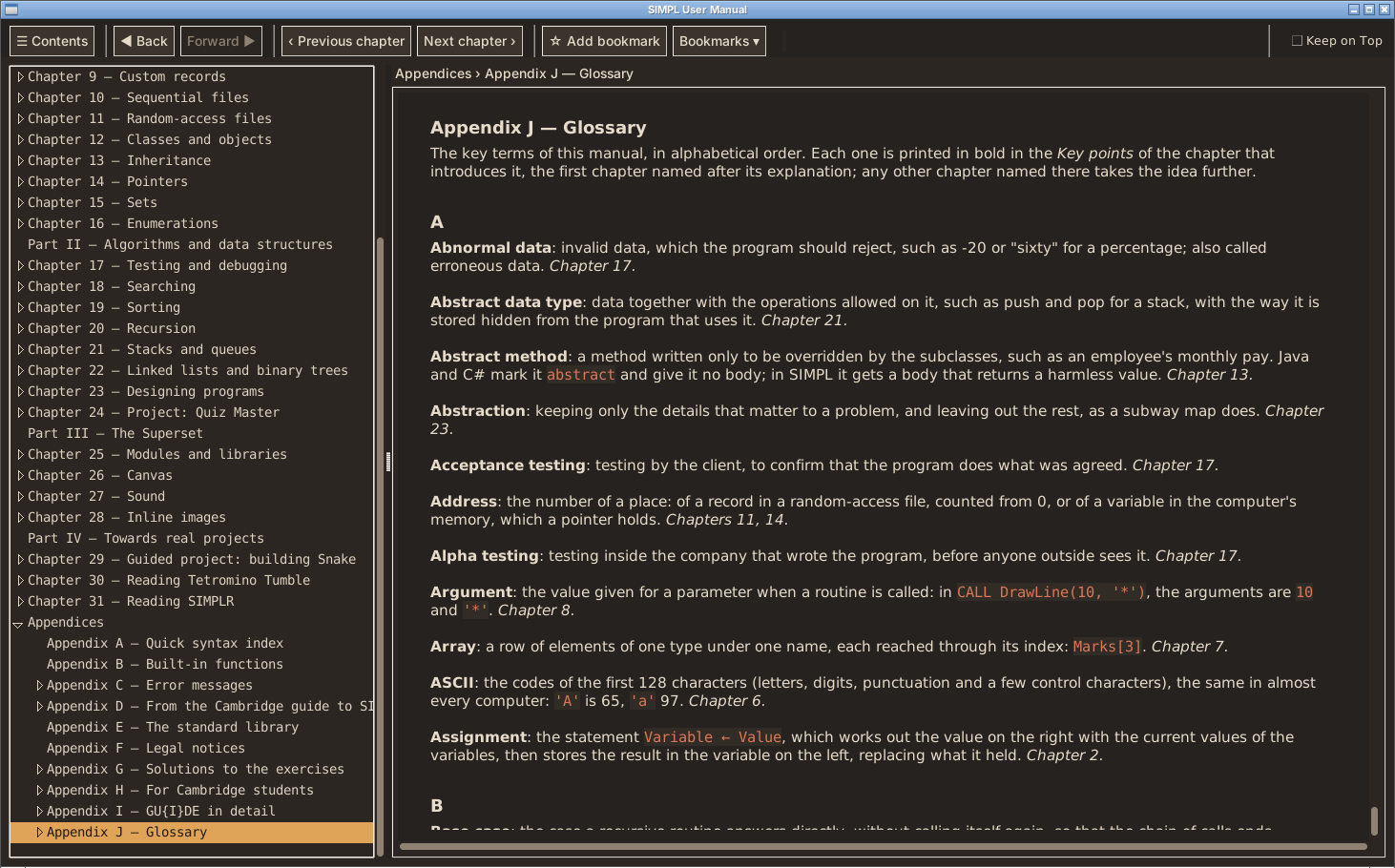
It is the same book that is built into GU{I}DE: 31 chapters, from your first program to your first game, with more than 400 programs, 81 diagrams, more than 200 exercises with their solutions, and a glossary of 181 terms.

Made to be read on a small screen

  • Laid out as a book: each chapter opens on a page of its own, headings never end a page, and short programs are never split across two pages.
  • Type made for screens: Literata for the text and JetBrains Mono for the code, where 0 and O, or 1, l and I, can’t be confused.
  • Code you can read: programs in GU{I}DE’s colors, their output framed apart. A line too long for the screen wraps under its own indentation, so the structure of the program stays clear.
  • Real diagrams: the diagrams that show what a program doesn’t (memory, calls, loops) are drawn as images, with lines and arrowheads, and you can zoom in on them.
  • Easy to find your way: a full table of contents with every chapter and section, links between sections, and a bar of letters to open the glossary.

Tested with Thorium Reader on the PC and Google Play Books on Android: both are recommended. Some other readers apply their own styles and may change the layout.

Free to share

The manual is free to pass on. You can copy it and share it with anyone, in any medium or format, under the CC BY-NC-ND 4.0 license: name the author, keep it unchanged, and don’t use it for commercial purposes. The programs in the book, including the solutions to the exercises, are under the MIT No Attribution license, so you can use, copy and change them for any purpose, in your own programs, homework and lessons, without asking. Appendix F has the details.

Know someone who is learning to code? Send them the book.

The book and the IDE

The e-book is a companion to GU{I}DE, not a replacement. In GU{I}DE, Open in editor puts any program of the manual in the editor, ready to run, and More › at the end of an error message opens the page that explains it. The e-book mentions these buttons: you’ll find them in GU{I}DE.

Thanks

The e-book was suggested by OnyxAsm23 on the community board. Thank you! Ideas like this one shape SIMPL, so keep them coming.

SIMPL and GU{I}DE: free download for Windows and Linux at simpl-pseudocode.itch.io/simpl, with the e-book next to them.

The manual is now available as an EPUB e-book: you’ll find it on the SIMPL page, next to the Windows and Linux downloads. It’s tested with Thorium Reader and Google Play Books. Let me know how it reads on your device!

No hurry at all, try whenever you have time, and your friend can help you with it too. The simplest thing is to move simpl.appimage into your Home folder, then right-click it, choose Properties and turn on “Allow executing file as program”. If it still doesn’t start, just let me know and we’ll try to figure it out.

Thank you! I spent quite some time on those colours, so I’m really glad you like them.

No need to apologise at all, your messages are perfectly clear. Write however it comes, what matters is the ideas.

No bother at all, reports like this are exactly what I need, thanks!

About the AppImage: since you’re short of space on the Linux side, did you save it on the Windows partition? Ubuntu usually mounts Windows (NTFS) partitions without permission to run programs, so chmod +x has no effect there and the AppImage won’t start. If that’s the case, moving it to your home folder should fix it.

If it still doesn’t start, could you open a terminal in its folder and run:

./simpl.appimage

and send me what it prints? If there’s an error about FUSE, this should work instead:

./simpl.appimage –appimage-extract-and-run

About the answers: the solutions to the exercises are already in a separate appendix (Appendix G), so you can try them first. Did you mean the output shown right below the examples in the chapters? A “predict before you run” mode, where you write what you expect a program to print and SIMPL compares it with the real output, is already planned, and it sounds close to what you have in mind.

You’re welcome! Feedback like yours is really useful, so feel free to share any other ideas or problems you run into.

Thanks! It’s an interesting idea, and it would make things simpler on a phone. Still, I’d rather keep the manual inside SIMPL in any version: opening an example straight into the editor, or jumping from an error to its explanation, is one of the things that help most when learning. The EPUB would be a companion for reading on the go.

Thanks again for the suggestions!

Thank you, that’s a great point. Following a finished trace and predicting the next step really are different things, and the second is the one that shows you’ve understood. I’m planning more “predict first” exercises for the manual, and pausing a diagram so the reader fills in the next values before seeing them fits that perfectly. I’ve added your idea to the list.

Hi, and thank you so much for your kind words, I’m really glad you enjoy SIMPL.

About a mobile version: an APK would be interesting, but it isn’t a matter of packaging what’s already there. SIMPL’s interface would have to be rebuilt from scratch for touch screens to offer the same level of UX, and that’s a big job. Right now I’m focused on expanding and refining the Windows and Linux versions. The same goes for a possible browser version: building the UI without constraints of any kind is what allowed me to refine it and set it up exactly the way I wanted, and to me that’s a central part of the user experience, which is so often spoiled by interfaces that aren’t well thought out or user-friendly.

That said, I don’t rule anything out, so I may well consider these suggestions in the near future.

An EPUB version of the manual, on the other hand, is a great idea and much more within reach: I’ll look into it for an upcoming release, so you can read it on your phone or e-reader on the go.

Thanks again for the feedback!

(1 edit)

SIMPL 1.3.1 is out, and it’s all about the User Manual. Every chapter now ends with its Key points, a new glossary gathers 181 key terms, and new diagrams show, step by step, what happens inside a program as it runs. Reading a chapter, reviewing it before a test, finding a term again: the manual is ready for all three. The language is unchanged: every program written for 1.3 runs exactly as before.

A first program in a minute

Meet GU{I}DE now fits on one screen: a map of the window and a five-step Quick start. The full tour of the environment, from the debugger to the menus, has moved to a new appendix, GU{I}DE in detail, for when you want to look something up. And Chapter 1 now asks you to make a mistake on purpose, right after Hello, world: delete a quote, run, and read the error report. Errors become something to read, not something to fear.

Key points and a glossary

Every chapter now ends with its Key points: six to eight lines that sum it up, with the key terms in bold. Each of those terms is explained in the new Glossary, 181 entries in alphabetical order, each pointing to the chapter that introduces it.

Diagrams, from the first step to the last

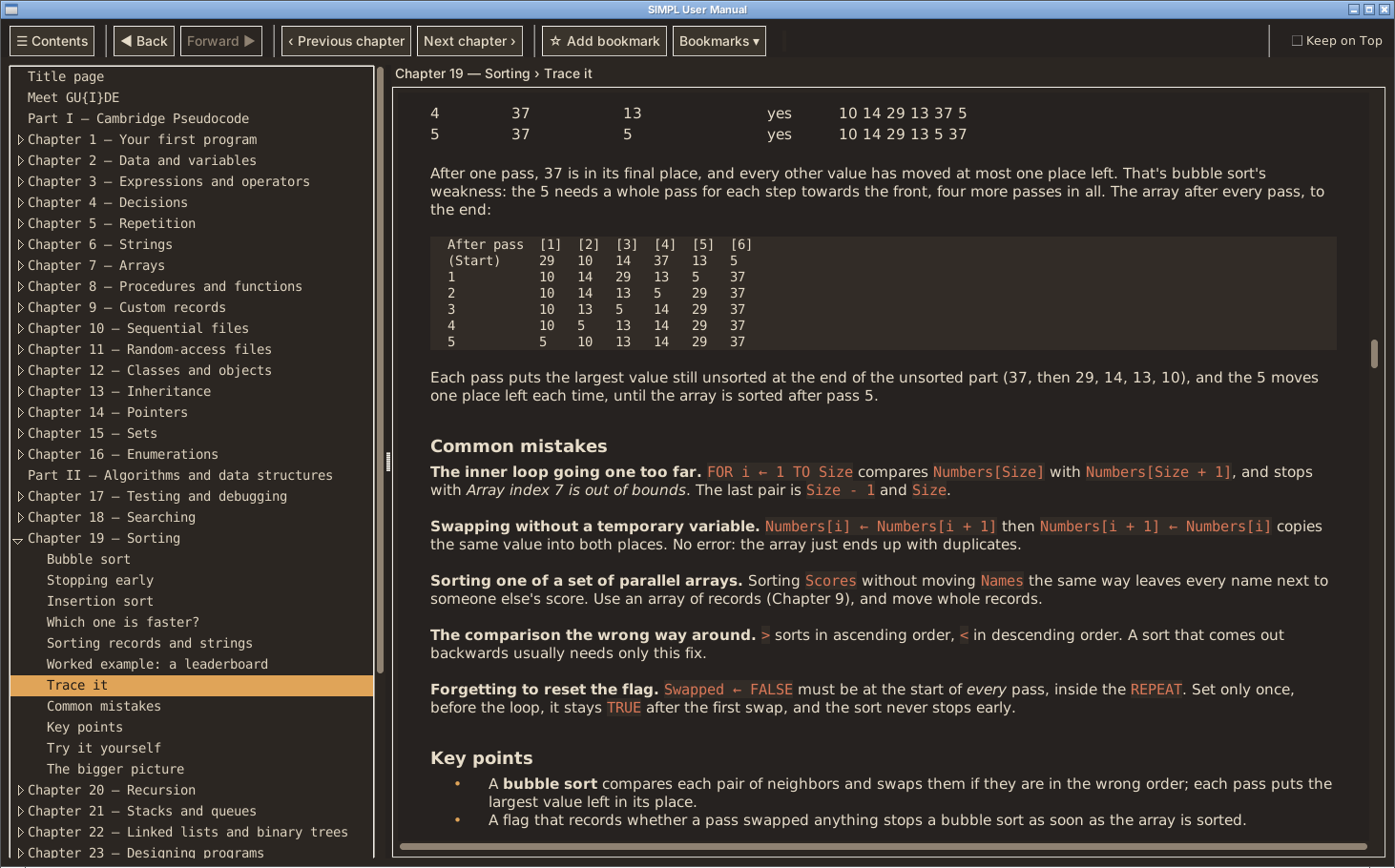
Memory, the order of evaluation, the flow of a loop: a program doesn’t show them, so the manual draws them. Where an idea appears for the first time, the diagram follows it all the way: every pass of a bubble sort, the call stack of a recursive function, a linked list, a binary tree growing one insertion at a time.

Objects, one idea at a time

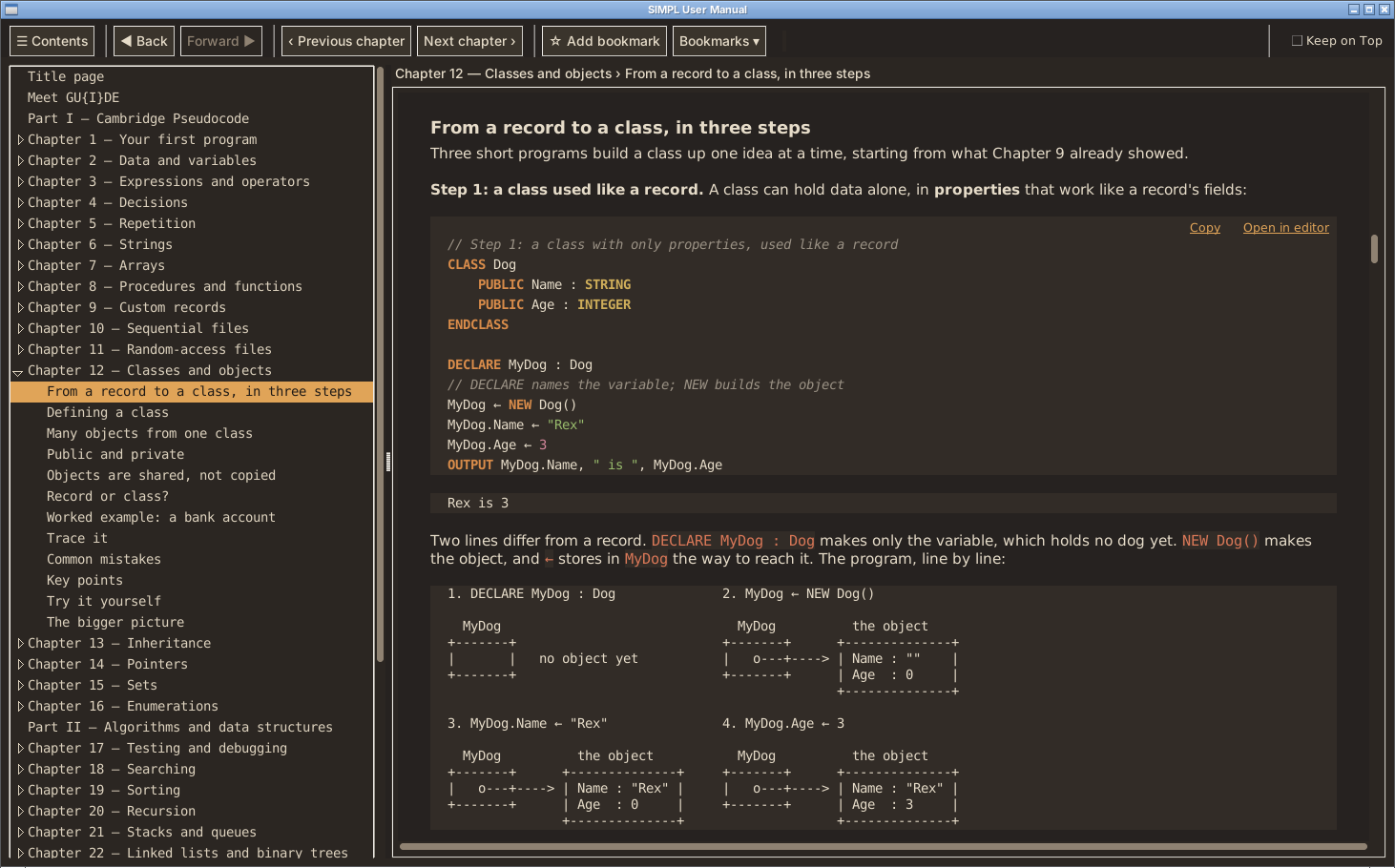
Chapter 12 now opens with From a record to a class, in three steps, and draws what DECLARE and NEW each make: the variable, and the object it refers to. It’s the heart of object-oriented programming, so it gets a picture of its own. Chapter 13 explains how SIMPL finds a method, so overriding, inheriting and SUPER all follow one rule.

How to update

Download the new simpl.exe (Windows) or simpl.appimage (Linux) and put it in place of the old one: your settings, programs and libraries are next to it and are kept, and so are your bookmarks in the manual. One file that comes with SIMPL has changed, programs/tetromino_tumble.simpl. SIMPL never overwrites your copy, which still works; to get the new one, rename the old file (for example to tetromino_tumble_1.3.simpl) and start SIMPL 1.3.1.

Everything in this release

  • Meet GU{I}DE fits on one screen, with a Quick start; the full tour is in Appendix I, GU{I}DE in detail.
  • Break it on purpose: Chapter 1 shows how to read an error report.
  • Key points at the end of every chapter.
  • A glossary of 181 terms, Appendix J.
  • Diagrams that follow each new idea from the first step to the last.
  • Objects introduced one idea at a time (Chapters 12 and 13), and The stack as a class (Chapter 21).
  • Every example and exercise runs exactly as printed; reference material, such as the lists of reserved words, is gathered in the appendices.

I think it’s rarely down to just one single metric like raw traffic or account age. Rather, it’s a confluence of multiple factors: established reputation, track record, legal/corporate entity status, and overall history across the industry.

All these elements together demonstrate that you’re dealing with a serious, consolidated entity rather than just an individual account. The main issue with automated or purely threshold-based verification (like “X downloads” or “clean history for Y months”) is the risk of a “Trojan” scenario: a bad actor could build a legitimate presence with a few small projects just to gain automated access, and then slip something malicious through once manual reviews are bypassed.

For a team like Double Fine, the reputational and legal stakes are massive, making the risk profile completely different. So I imagine Itch’s criteria are inherently holistic and handled case by case.

While reading Haremsoft’s post, I was actually thinking that, for instance, Double Fine must have had (and rightly so) some kind of “priority lane”, and I imagine other high-profile developers did too. It also seems pretty normal to me, after all, just as it makes sense not to extend this possibility to absolutely everyone.

Hi, and thanks for the first post on the forum! Your English is fine, I understood the idea well: games made of ASCII art that run in the SIMPL console, like terminal games.

Good news: your blinking cat already works in SIMPL today. A sprite can be an array of strings, one per row, and a small FUNCTION can replace part of a row. Paste this in GU{I}DE, press Run, then type Pet it:

// Blinking cat: an ASCII-art sprite in the console
// The sprite is an array of strings, one per row
DECLARE Cat : ARRAY[1:3] OF STRING
DECLARE Wish : STRING

// Replaces the first Found in Text with Changed
FUNCTION Replace(Text : STRING, Found : STRING, Changed : STRING) RETURNS STRING
    DECLARE Position : INTEGER
    FOR Position ← 1 TO LENGTH(Text) - LENGTH(Found) + 1
        IF MID(Text, Position, LENGTH(Found)) = Found THEN
            RETURN MID(Text, 1, Position - 1) & Changed & MID(Text, Position + LENGTH(Found), LENGTH(Text))
        ENDIF
    NEXT Position
    RETURN Text
ENDFUNCTION

PROCEDURE DrawCat()
    DECLARE Row : INTEGER
    FOR Row ← 1 TO 3
        OUTPUT Cat[Row]
    NEXT Row
ENDPROCEDURE

Cat[1] ← "    A-----A"
Cat[2] ← " =( 0     0 )=___)"
Cat[3] ← "    !-----!-----!"
CALL DrawCat()

OUTPUT "What do you want to do with this cute cat?"
OUTPUT "[ Pet it | Do nothing ]"
INPUT Wish
IF UCASE(Wish) = "PET IT" THEN
    Cat[2] ← Replace(Cat[2], "0     0", "-     -")
    CALL DrawCat()
    OUTPUT "Purr..."
ELSE
    OUTPUT "The cat goes back to sleep."
ENDIF

The cat first looks at you, then closes its eyes when you pet it:

    A-----A
 =( 0     0 )=___)
    !-----!-----!
What do you want to do with this cute cat?
[ Pet it | Do nothing ]
    A-----A
 =( -     - )=___)
    !-----!-----!
Purr...

What SIMPL can’t do yet is clear the console or redraw in the same place, so each new frame appears below the old one. A Replace function in the string library and a way to clear the console are now on my list of ideas. I can’t promise when, but your post is the reason they are there.

For real-time games (keys without Enter), the Canvas is still the way: KeyDown and KeyPressed read the keyboard while the game runs.

I’ve been working on it for a couple of years, and a month ago I decided it was mature enough to publish. The idea is to help students and beginners get into programming organically and easily, picking up skills they can take with them to other languages.

SIMPL 1.3 is out, and it's a release about learning. SIMPL now notices more of the mistakes a beginner makes, points to them the moment they happen, and explains each one in plain words, with a hint on how to fix it. It also brings new functions, and every example of the Cambridge 9618 Pseudocode Guide is now part of SIMPL's own tests.

Error messages that teach

All the messages SIMPL can give, about 250 of them, were rewritten in one style. Each says what SIMPL expected and what it found, in the words of pseudocode, and ends with a hint. A misspelled name gets a suggestion, and habits from other languages (==, !=, .5) get a friendly message of their own.

Mistakes caught early

A function called as if it were a procedure, a number passed to a BYREF parameter, a name defined twice, a date or an object used before it has a value, a REAL used as an array index: SIMPL now spots each of these where it happens and says how to put it right, so a small slip never grows into a puzzling result ten lines later. Many are found before the program even starts.

New functions

ASC and CHR convert between characters and their codes; DAY, MONTH and YEAR take a date apart; TIME() gives the seconds since the program started, the right way to keep time in a game. And Canvas.Save now writes a PNG.

And also

Routines can be called before their definition, so a program can open with its main part. A BYREF parameter is the caller's variable for the whole call, just as the manual describes it. = compares records and arrays element by element. Cambridge Strict Mode points out even more details for exam practice: accented names, guide keywords used as names, a file written with other capitals. The User Manual quotes every message exactly as SIMPL gives it, and Part III writes Canvas and Sound as programs do.

Before you upgrade

A few forms that SIMPL used to accept now get a message that says what to write instead: for example a backslash in a string is now an ordinary character, a string ends on its own line, and GETPIXEL is now called IsPainted. The full list is in the release notes below.

To upgrade, replace simpl.exe or simpl.appimage with the new one: your settings, programs and libraries are kept. Two files that come with SIMPL must be replaced, because SIMPL never overwrites them: rename programs/simplr.simpl and lib/shapes.simpl (for example to simplr_1.2.simpl), then start SIMPL 1.3, which copies the new ones in their place. It's worth doing the same for programs/tetromino_tumble.simpl and lib/structures.simpl.

Questions, ideas or bugs? Come and tell me on the SIMPL Community.


Full release notes

Compatibility. Most programs written for SIMPL 1.2.1 run unchanged in 1.3. Programs that rely on a form the guide doesn't allow, or on a detail where SIMPL used to be more lenient than the manual describes, now stop with a message that says what to write instead. None of the programs in the User Manual or in lib does any of these; for programs, see Upgrading from 1.2.1.

  • Strings. A backslash is an ordinary character: "C:\temp\new.txt" is exactly what it looks like, and "a\nb" is four characters, not two lines. A double quote inside a string is written twice, "He said ""hi""" (\" is now an error). A string must end on the line where it starts.
  • Functions and procedures. A FUNCTION called on a line of its own (Square(3), CALL Square(3), LENGTH(S)) now stops: use its result, X ← Square(3). WAIT is the exception, and is called as a procedure: CALL WAIT(0.1).
  • BYREF. The argument of a BYREF parameter must be a variable, an array element or a field: a number or an expression now stops. A BYREF parameter can't be the counter of a FOR loop.
  • Arrays. An array parameter declared with bounds (ARRAY[1:5] OF INTEGER) takes only an array with those bounds; ARRAY OF INTEGER without bounds still takes any size. An index must be an INTEGER: A[4 / 2] now stops (write A[4 DIV 2]), and so does a REAL address in SEEK.
  • Names. A name means one thing in a whole program: defining it twice, or for two different things (a variable and a procedure, a property and a method of the same class), now stops before the program runs. So does a library that defines a name the program already defines, and giving a value to the name of a routine, a class, a TYPE or an image.
  • Definitions. A PROCEDURE, FUNCTION, TYPE or CLASS can only be defined at the top level of a program (or, for routines, inside a CLASS), not inside a loop, an IF or another routine. A constructor is a PROCEDURE named NEW, not a FUNCTION. A parameter can't be DECLAREd again inside its routine.
  • Comparisons. An enumerated value is compared only with a value of its own TYPE (Spring = "Spring" now stops: write Spring), and IN only with a value of the set's type. A CASE label of another type than the value after CASE OF now stops. Records of two different TYPEs can't be assigned or compared, even with the same fields.
  • Missing values. A DATE with no value, or an object variable before NEW, now stops when its value is used (printed, joined, compared, converted), with D has no value yet or MyCat holds no object yet: create it with NEW.
  • Functions. LENGTH of a number and RAND of 0 or less now stop.
  • Graphics and sound. GETPIXEL is now called IsPainted, and works as before. The methods of Canvas and Sound that take whole numbers (coordinates, sizes, colors) no longer accept a REAL: DrawRectangle(20 / 4, ...) now stops (write 20 DIV 4). An unknown key name (KeyDown("Spcae")) now stops, suggesting the closest one. Passing too many arguments to a method now stops.
  • Numbers typed or read from a file are read as a program writes them: 1_000 or .5 now stop with Invalid input.
  • What is printed for a whole record, object, image or Canvas follows the program's own spelling: Cat(Name: "Kitty", Lives: 9), Canvas (320 x 240).
  • Error messages have new wordings, all in one style (see Error messages below).

Calling a routine before its definition, which used to stop with Undefined procedure, now works. A program of your own that uses one of the new function names (ASC, CHR, DAY, MONTH, YEAR, TIME) for its own routine or variable keeps working: your definition comes first.

Upgrading from 1.2.1

  1. Put the new simpl.exe (Windows) or simpl.appimage (Linux) in the same folder as the old one, replacing it. Your settings (simpl_settings), your programs (programs) and your libraries (lib) are next to it, and they are kept.
  2. Four files that come with SIMPL have changed, and SIMPL never overwrites a file that is already in your programs or lib folder (it might be one you changed). Rename the old ones, for example simplr.simpl to simplr_1.2.simpl, then start SIMPL 1.3: the new files are copied there at startup. Your renamed copies stay as they were.
    • programs/simplr.simpl must be replaced: the old copy stops with a syntax error in 1.3 (it uses \" in strings).
    • lib/shapes.simpl must be replaced: the old copy stops any program that IMPORTs it, because its class had a property and a method with the same name.
    • programs/tetromino_tumble.simpl and lib/structures.simpl still work, but the new copies follow the manual and the guide (Cambridge Strict Mode reports less in them) and keep Tetromino Tumble closer to real time on a slow computer.

If you put SIMPL 1.3 in a new, empty folder instead, it starts with fresh copies of everything; copy your own programs over from the old programs folder.

New functions

  • ASC(C) and CHR(N) convert between a character and its code: ASC('A') is 65, CHR(66) is 'B'.
  • DAY(D), MONTH(D) and YEAR(D) give the parts of a DATE as whole numbers.
  • TIME() gives the seconds since the program started, as a REAL: the way to measure time in a game or an animation (Now ← TIME(), Elapsed ← Now - Last). The time spent paused in the debugger doesn't count.
  • Canvas.Save writes a PNG when the name ends in .png, which every image viewer opens.

These are SIMPL extensions: Cambridge Strict Mode points them out.

The Cambridge guide, in every detail

  • Every example of the guide is now part of SIMPL's own tests, copied as the guide prints it, and gives the guide's result. Only one stops, as it should: the example of section 10.1 that calls a PRIVATE method from outside its class, which is what PRIVATE forbids.
  • CALL Beep without brackets, as the guide's own CASE example writes it, calls a procedure with no parameters.
  • Routines and classes can be used before their definition, as in Java or Visual Basic: a program can put its main part first and its routines after.
  • A BYREF parameter is the caller's variable for the whole call, as the manual explains it (and as Pascal's var or C++'s &): changing it changes the caller's variable at once, not only at the end of the call.
  • The counter of a FOR loop in a routine is always local to the routine, so a routine can never change the counter of the loop that called it.
  • = and <> compare records and arrays element by element: two records with the same fields are equal (they never were before).
  • A CASE range works for text and dates too: "A" TO "L" :.
  • The built-in functions are names, as in Python or Pascal: a variable, field or method can be called Left or Length.

Cambridge Strict Mode

Strict Mode now also reports: a name with accented letters; a keyword of the guide used as a name (Length, Step); the same file written with other capitals ("Scores.txt", "scores.txt"); LENGTH of an array; = and <> between whole arrays or records; a REAL written 5.; DECLARE for a property of a CLASS (the guide writes PRIVATE Name : STRING); CASE OF followed by an expression; RAND of a REAL; CALL without brackets; a double quote doubled inside a string.

Error messages

Every message SIMPL can give, about 250 of them, was reviewed and rewritten in one style:

  • each says what was expected and what was found, in SIMPL's own words, without Python terms such as bool or identifier;
  • names are written as in your program, and comparisons name the types: Cannot compare an INTEGER with a STRING;
  • a misspelled name, class or method suggests the closest one: Class Canvas has no method DrawRectangel / Did you mean DrawRectangle?;
  • the forms of other languages get a message of their own: ==, !=, .5;
  • every message has a hint, and errors found before the program runs always read Syntax error on line N: the program was not run;
  • a mistake is marked where it is: in a comparison under its operator, in an IMAGE on the wrong row.

The User Manual

  • Every message it quotes is the one SIMPL now gives, and every example of Part III runs as shown.
  • Chapters 26 and 27 are now Canvas and Sound, and Part III writes them as programs do: DECLARE Screen : Canvas, Screen.SetColor(255, 0, 0), without CALL before a method.
  • Chapter 26 explains TIME, and Chapters 27 and 30 use it to keep time.
  • The manual follows only the Cambridge 9618 Pseudocode Guide 2027-2029, and Appendix H no longer describes the exam papers.
  • Meet GU{I}DE is easier to read, with the menus as a list.
  • A bookmark on Chapter 26, Chapter 27 or a step of Chapter 24 now opens the manual at its start, because their titles changed.

The IDE

  • The Variables panel writes names as your program does, tells a CHAR ('K') from a STRING, shows an object's properties on its row, and leaves an empty value for a DATE or an object that has none.
  • Every built-in function is colored as a keyword where it is called, and written in capitals as you type it (length(s) becomes LENGTH(s)), while a variable called Length keeps the look of a name.

Fixed

  • A date the calendar doesn't have (31/02/2020) closed the run without a message.
  • An array bound that isn't a whole number gave an internal error.
  • A class inheriting from Canvas or Sound gave an internal error; one inheriting from a class that doesn't exist was accepted.
  • A PROCEDURE method used as a value gave NULL in silence.
  • A mistake on the first word of a program was reported differently from every other syntax error.
  • An IMAGE row written without quotes was reported on the line above, with a garbled message.
(1 edit)

This is not a tech support forum. That is the kind of thing I talk about. You have no insight. You talk like an AI that knows something about support forums, but not like a person that has been on Itch for many years.

The only resolving thing that was done and that will be done within forum posts on Itch, is forwarding of the ticket number to admins - which was already done long ago. Threads do not get resolved. Your argument’s premise relies on threads getting resolved and arguing from the view point that since that thread was not resolved, Itch staff would not act on reports.

I already replied to Leafo about this point yesterday. My answer remains the same for you, so I won’t repeat it again. If you’re okay with it and want to finally understand the point, great; if not, that’s fine too.

That is not quite what I was repling to, nor what I answered. You made the suggestion that Itch should implement and create a proactive and reactive response.

To which I replied that those are already in place. There is no arguing “against you” in that reply.

But when you backpaddled out of this, by claiming you already were aware of that, and when you brought up again that thread you saw, as a fact that Itch does nothing, only then I argued “against you”.

As I said, it doesn’t matter much whether systems like that are currently in place or not; what matters is that they clearly aren’t working as they should, including the biblical wait times to get a response from support. So fine, they exist, but they don’t work, meaning they should be properly implemented so it doesn’t look like the opposite. Is that clear enough now, or are you going to split hairs this time too? I guess you will, since that seems to be your modus operandi.

This is not a tech support forum. That is the kind of thing I talk about. You have no insight. You talk like an AI that knows something about support forums, but not like a person that has been on Itch for many years.

I’ve been a member for several years, but I had never really participated. I started getting active a couple of weeks ago when I published my project. That’s when I started becoming aware of how things actually stand.

P.S. Since I’m honestly sick of interacting with you, given how pointless these arguments are and your constant veiled accusations that I’m using AI to reply, I’ve blocked you, hoping the option applies to the forum as well so I won’t have to read your posts anymore. In case it doesn’t, let me say in advance that I’ll leave you with the last word (which I assume you’ll want to have) and I won’t reply to you again in the future (and I’d appreciate it, though I know I can’t enforce it, if you’d extend me the same courtesy). Thanks, and all the best.

Thanks for sharing the link.

And thank you for considering it. It was the least I could do after raising the issue, I’m not the type to throw a stone and hide my hand. If I make a claim, it’s because I know I can back it up with facts.

I see that it’s an anime game. We get a wide range of reports for explicit anime content. There’s definitely a lot of questionable material there, but CSAM content is a very specific case that is handled with extreme priority and I would not consider this example that. In this example, I can see that the image that the person was trying to report is still freely accessible directly on Steam, so Steam appears to not have taken any moderation stance on it either. When someone is offended by a piece of content, they often come up with the most extreme language possible to describe it. That’s part of the struggle of processing user reports for fictional or drawn content. As a reminder, any imagery of real humans in sexual situations is explicitly prohibited and will result in an instant ban by our team.

Allow me to be frank and straightforward without beating around the bush. I hope you will take this as constructive feedback rather than empty criticism for its own sake, as my intention is to make a positive contribution to the platform. Having experience with what it takes to run a sizable organization, I certainly understand your position and the objective difficulty of evaluating fictional or drawn content in certain artistic styles.

As I mentioned, I have no intention of personally verifying the content in question because I deeply abhor and detest these themes. I refuse to view them even for the purpose of condemning or reporting them, unless I encounter them accidentally, in which case I definitely would.

However, regardless of whether the specific report turned out to be a false alarm or if the user described it in extreme terms, the main point remains: support should handle these kinds of reports with absolute priority and address the merits of the case as quickly as possible, even if only to clarify the stance and reassure the community. These issues are far too serious and sensitive to be left hanging or open to interpretation for extended periods.

Furthermore, a thread involving allegations of this severity should see a direct intervention and official response from an admin or staff member, rather than relying solely on a community moderator, who is certainly not at fault here, stating they can do no more than forward the report and that staff usually does not offer direct explanations. Clear and timely communication from staff is essential to protect the reputation of the platform and maintain user trust.

Again, I apologize for my bluntness, but this is precisely the opposite of what should happen, and I do not believe this is an unreasonable request, quite the contrary. Once again, I hope these words are received in the spirit they were intended, rather than as criticism for its own sake.

Regardless, we’ll review these pages to see if they’re in violation of our terms of service.

Thank you for taking the time to review the pages and for listening to my perspective. I really appreciate it.

Very interesting concept and well executed! I remember back in the 80s I created something similar in BASIC on the Commodore 128 and called it “Computer Wars” (it included hardware as well as chips). Great job, well done!

Alright, the link to the discussion is this https://itch.io/t/6852885/hidden-contents-in-game-file-that-violate-tos-request-number-393153

I should mention beforehand that I have not personally downloaded or executed the file in question because I do not want that kind of garbage on my PC, nor do I even want to open its page. However, the issue still seems to be open, at least according to the original poster.

When I spoke about a dedicated channel, this is exactly what I meant. Support should be able to respond and intervene promptly in situations like this.

I believe my posts are clear. If you enjoy creating pointless controversy and using sophistry just to be right, which I have already noticed you like to do, that is a different story. I know a contrarian when I see one online. Nothing personal, but I do not particularly appreciate this kind of attitude.

You talk about shock value and bring up AI to implicitly accuse me of replying through a LLM. Now that is a subtle way to discredit the person you are talking to.

Regarding the issue I read about, it was definitely not resolved, as the thread remained open and unsolved. Therefore, it is likely a completely different case altogether, as I assume it is not the only one that has ever come up. Anyway, as I mentioned above, I am currently looking for the thread and will post it here if I find it.

Either way, I do not quite understand your stance. You yourself are aware that malware is rampant, you have written so repeatedly across multiple threads, and that stricter controls are needed. Yet, the moment I supported your own claim, you started arguing against me. Go figure.

As I mentioned at the beginning, I read about the issue in a thread opened by another user while I was browsing the forum and reading various discussions. I didn’t save the link because I didn’t think I’d be discussing it with you, and also because the user mentioned that they had reported the issue to support several times without success. Anyway, I’ll take my time to check my browser history to try to find it and post it here.

Cute, fun, and accessible game, especially as a fan of vertical climbers like me. Well done.

I am aware that, on paper and in theory, this modus operandi is already in place, but it seems evident to me that (as you yourself confirm with your experience) it isn’t working properly and a lot, perhaps too much, still manages to slip through and get indexed/published.

The issue of an understaffed team seems so obvious to me that there is no need to reiterate it further. Given the massive amount of content currently available and continuously being added, expanding the staff to the extent required for the necessary manual checks isn’t economically viable. Therefore, the best approach would be to put greater friction and automated entry barriers in place.

This would then allow for a prompt response, which is critically needed in these circumstances, to reports such as the one I brought up regarding child pornography content. Such content should be removed immediately, the associated account permanently banned, and, if appropriate, reported to the relevant authorities as well.

(1 edit)

Believe me, it’s not that I don’t understand your point of view, in fact, I agree with it in principle. The issue is that I believe (and I don’t think I’m the only one, quite the contrary) that it would be appropriate to put up a dam against the tide of slop and shovelware that (unfortunately) manages to get past what should be the checks designed to prevent its indexing (or at least, I assume that’s the intent; I have no reason to assume otherwise, but I could be wrong, and as far as you guys are concerned, the problem might not even exist).

The point would be to create the best possible conditions for developers of high-quality software and to limit slop as much as possible. This would help them and it would help you too, since high-quality products that are easy to find create a good overall impression and, consequently, good sales.

Keep in mind that I’m speaking as an entrepreneur of 35 years, so my perspective is perhaps a bit too business-oriented, whereas you might prefer a more “anarchic” approach (in the best sense of the word, obviously). If that’s the case, then things change, though I’m not sure to what extent being flooded with low-quality products can ever be a competitive advantage, and there’s a real risk of being submerged by the tide, especially today with AI (which, when used thoughtfully, is a great tool, but unfortunately is often used recklessly).

Thanks for the discussion, in any case.

(4 edits)

Fingers crossed. I saw over 1000 malware uploads. That were malware uploaders that were indexed. It made me sick, and I had to stop.

Yes, if I’m not mistaken, I read elsewhere where you brought up this issue, which is undoubtedly one of the most serious and pressing ones to address. In my view, they should tackle this on two fronts:

  • Proactive: by implementing automated checks that are as strict and effective as possible, to nip the upload of compromised files in the bud (whether intentional or not, since sometimes a virus or malware can creep in without any malicious intent from the uploader, but the end result remains the same and should be prevented).

  • Reactive: by creating a privileged, dedicated support channel for these types of reports, as well as for other equally important ones (for instance, I read about a user who repeatedly reported child sexual material “hidden” inside an indexed NSFW program retrievable via search, without success).

I hope this aspect will be addressed as soon as possible.

As I mentioned in the thread linked in my previous post, my proposal isn’t about publishing, but indexing and precisely because I fully understand the desire to keep the core assumptions of the former unchanged. However, I believe these two aspects are different and could therefore be handled differently. Of course, this is just a simple suggestion, but I do think it has some merit.

(2 edits)

I know the next issue many people have with this system is lack of communication to the developer about their indexing status. I hope to address that soon as well. Once we get a bit more comfortable with the current set of rules, we want to make the specific reasons why a page might not be eligible to be very clear. Unfortunately there will always be a bit of mystery to how the system works, as we have malicious actors every day trying to reverse engineer our systems to figure out how to get their spam and malware to show up in front of real people.

I think it would be extremely helpful to have an “indexed / not indexed” status tag on the project page alongside the green “published” tag, along with the reason for non-indexing and steps to resolve it independently. This would reduce a lot of frustration and significantly decrease the volume of support requests and forum posts.

I know many people discussing the indexing issues online often float around the idea that we should charge for publishing like Steam. We will not be doing this.

Does this also apply to the “refundable deposit” model I proposed and discussed in this thread? Just so I know, so I avoid bringing it up again in the future. Thanks!

Awesome! Once I get a free moment, I'll definitely check it all out.

Thank you so much for the kind words of appreciation. I’ve also been a long-time fan of BASIC, having started my IT career back in 1982 with the Commodore VIC-20. By the way, SIMPL actually includes an 80s-style BASIC interpreter, which I named SIMPLR.

As a side note, I took a look at your creations (just briefly due to lack of time, but I plan to delve deeper into them) and I really have to congratulate you. I was especially impressed by BTR,BBB, being a big fan of Wire-Hung-style vertical climbers (I imagine you're familiar with it). As soon as I get a moment, I'll check out the rest and maybe post my thoughts on the respective pages. Keep up the great work!

Thank you for the detailed explanation, that actually makes sense now.

To make sure I understood everything correctly, let me recap:

  • Browse Page: Queries the entire database by category and tags. Since SIMPL appears when browsing through Tools > Free > Linux > Programming Language, my project is indeed properly indexed.
  • Top Search Bar: Queries only the project titles directly, returning the top matches for those specific terms.
  • Search Filters: When filtering results after using the top search bar, the filters are applied only to that initial subset of title matches. Since "programming language" wasn't in my project's title, SIMPL wasn't included in those initial 40 title results to begin with.

So if I want SIMPL to also show up when users type "programming language" into the main search bar, adding a descriptive subtitle (like "SIMPL: Educational Programming Language") to the project title field should do the trick.

Thanks again, it was very helpful.

I'd like to understand exactly how indexing and search work, because I can't tell whether my project is indexed or not.

To explain better: if I go to the "Browse" page, select "Tools", then "Free", "Linux", and add the tag "programming language", my project appears alongside 4 other results. However, if instead of this procedure I search directly for "programming language" and then filter the results using the left sidebar by picking "Tools", "Linux", and "Free", I get 40 matches, but SIMPL doesn't show up.

So I'd like to understand the reason behind this apparent discrepancy - if anyone knows the exact cause - and how to fix it, if possible (this example uses the "programming language" tag, but the same thing happens with others as well). Thank you very much.

(7 edits)


Hi everyone!

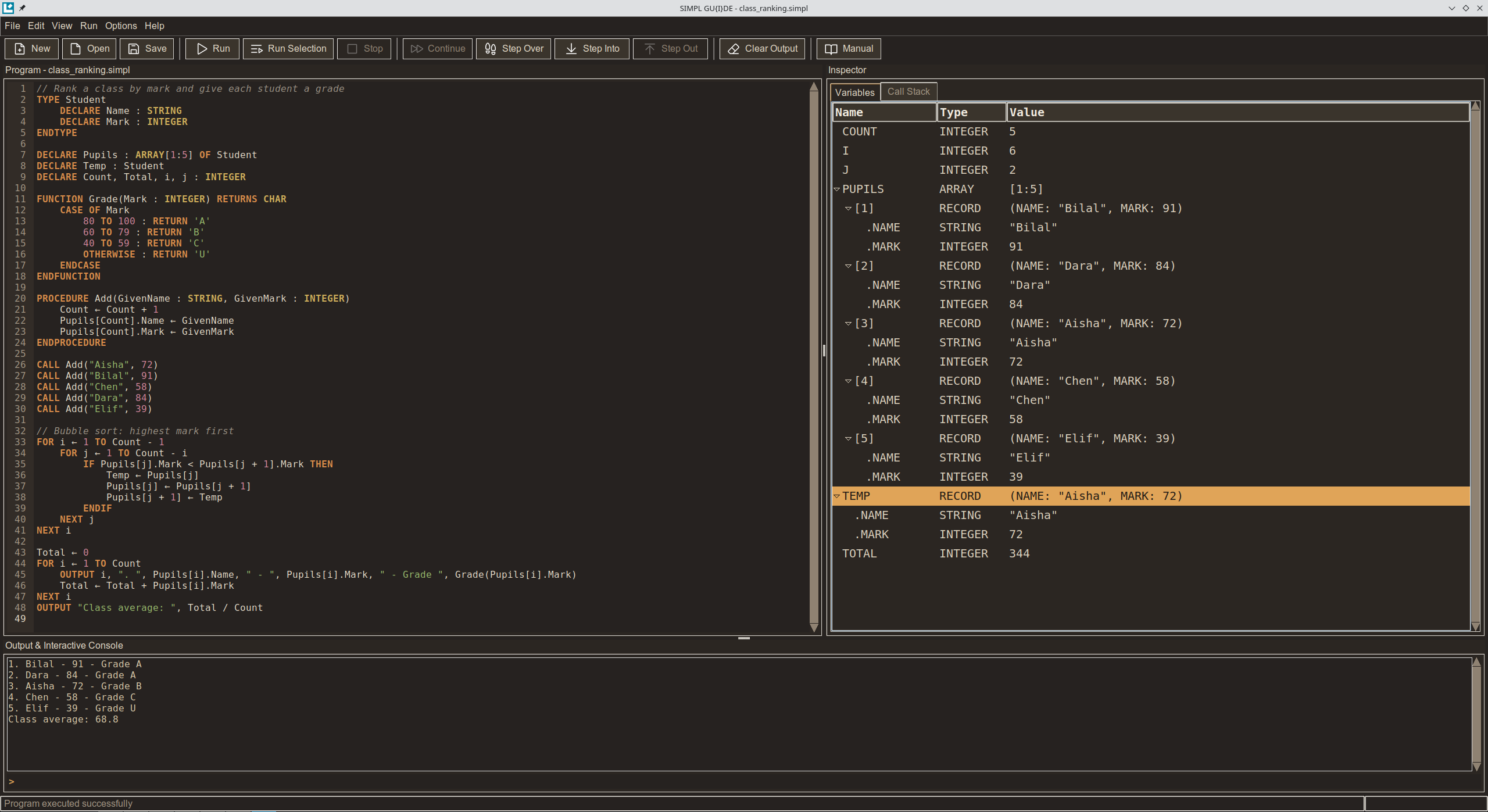
SIMPL is a free programming language and IDE for learning to code. It's based on pseudocode, the plain, readable notation used to teach programming in schools, but it actually runs.

The idea is simple: when you start programming, the language shouldn't get in the way. In SIMPL you write

OUTPUT "Hello, world!"

press Run, and that's it. No setup, no boilerplate, no cryptic error messages: when something goes wrong, SIMPL tells you what happened in plain words and links you to the page of the manual that explains it.

What I care about most is the path. SIMPL doesn't stop at the basics: variables, loops and arrays lead to procedures, records, files, classes and pointers, and then to graphics, sound and modules. By the end you're writing real games, all in the same language and the same environment, without having to switch tools halfway through.

That path is laid out in the manual built into the IDE: 31 chapters and over 200 exercises with worked solutions. It's really an introductory programming book: every example opens in the editor with one click, there's a guided project where you build Snake step by step, and the last chapters walk through two complete programs, a Tetris-like game and a small BASIC interpreter, both written in SIMPL. Along the way, "The bigger picture" sections show how the same ideas look in Python, Java or C, and where they come from.

SIMPL is a free download for Windows and Linux, and works offline.

https://simpl-pseudocode.itch.io/simpl

SIMPL 1.2.1 is a consolidation release. There is nothing new in the language this time: instead, I put SIMPL and GU{I}DE through a stress test, and fixed everything it found. Along the way, programs got faster, the IDE got quicker, and a few parts of the interface got a careful polish.

Faster everywhere

Programs run from a third faster to twice as fast, depending on what they do: loops and arrays are about twice as fast, in GU{I}DE and from the command line. Programs that print a lot are much faster in the IDE: 5,000 lines of OUTPUT took almost 2 seconds, now they take a few hundredths, and the window stays smooth while a program runs. Typing in a long program no longer lags, and searching (Ctrl+F) in the editor, the console and the User Manual is instant.

Keyboard Shortcuts, redesigned

The shortcuts window is now organized by task, one action per row, in the words of the menus, with its keys drawn as keys. It always fits the screen, even on a small laptop.

Start typing to filter: by name (save, run) or by keys (ctrl s, f5).

Zoom that works with UI Size

UI Size sets the size of the whole interface, and zoom (Ctrl++, Ctrl+-, Ctrl+0) works on top of it, from 70% to 200%, as in a browser. It now takes in the Inspector too: Variables, Call Stack and the Trace Table grow and shrink with the code, keeping the column widths you set. Your previous text size carries over.

Files from other programs

A program or a data file saved by Notepad or Excel with a BOM (an invisible mark at the start of the file) could stop with an error on a line that looked perfectly fine. Files in the older Windows encoding, with letters such as à and é, couldn't be opened at all. Both now just work, and GU{I}DE saves such programs as UTF-8.

And also

The dividers between the panels light up under the mouse, so they're easier to find, and scroll bars have a cleaner look, with a rounded slider and no arrows. Dates such as 25/12/2026 are colored as one value, which also shows when something you meant as a division is read as a date. The console keeps the last 10,000 lines, so a program stuck printing in an endless loop can't fill the memory. Dialogs taller than the screen now scroll, with their buttons always in view. And several error messages now say more clearly what went wrong and what to do.

Before you upgrade

Programs written for 1.2 run unchanged, with a few exceptions: mistakes that SIMPL used to let through in silence now stop with an error that explains them.

  • Declaring a variable a second time with another type.
  • An array whose first bound is greater than the second, such as ARRAY[5:1].
  • LEFT, RIGHT or MID with a negative number of characters.
  • Raising a negative number to a fractional power, or a BOOLEAN to any power.
  • A REAL calculation going past the largest REAL, which used to go on with inf.

None of the programs in the User Manual, in lib or in programs does any of these.

How to upgrade

Put the new simpl.exe (Windows) or simpl.appimage (Linux) in the same folder as the old one, replacing it. Your settings, your programs and your libraries are kept. No file in lib or programs has changed in this release, so there is nothing else to do.

Full list of changes

Faster

  • Programs run from a third faster to twice as fast.
  • Programs that print a lot run much faster in GU{I}DE, and the window stays smooth while a program runs.
  • Typing in a long program no longer lags.
  • Searching in the editor, the console and the User Manual is instant, and searches once you stop typing.

The IDE

  • Zoom works on top of UI Size, from 70% to 200%, and takes in the Inspector.
  • Keyboard Shortcuts redesigned, with a search box.
  • The dividers between the panels light up under the mouse; scroll bars have no arrows, a slider with rounded ends, and react more gently.
  • Dates are colored as one value.
  • The console keeps the last 10,000 lines.
  • Files with a BOM, and files in the Windows-1252 encoding, can be opened, run, imported and read with READFILE.

Error messages

  • OUTPUT with nothing after it now says OUTPUT needs a value to show, on its own line.
  • ^A[2] and ^R.Field now explain that ^ takes the address of a whole variable.
  • A field of an object not yet created with NEW always says so.
  • A program that can't be opened gets a message in plain words.

Fixed

  • Searching the User Manual closed GU{I}DE.
  • Integers of more than 4,300 digits stopped with an internal error.
  • A negative CASE label (-1 :) after a statement was read as a subtraction.
  • The field of an object in an array (Pupils[i].Name) couldn't be read.
  • A number too large for a REAL stopped with an internal error, or became inf.
  • The console's input line disappeared with large text.
  • Dialogs taller than the screen were cut off.
  • About and Keyboard Shortcuts flickered as they opened, and the User Manual's scroll bar jumped for a couple of seconds after opening.
  • At a smaller UI Size, the User Manual opened much wider than its text.
  • The bottom of the editor could flicker without end with a long line.
  • On Linux, scroll bars flashed while a divider was dragged or the window resized, and so did a thin light frame at the bottom of the console. Scroll bars now have no arrows and a slider with rounded ends, as in VS Code and most modern apps.
  • On Linux, the User Manual's scroll bar appeared a moment after its text, moving it slightly to the left.
  • On Windows, the whole window shook while it was resized.
  • On Windows, the User Manual opened white for a moment, and dialogs opened away from the center of the window, too high when it was maximized.
  • On Windows, disabled menu commands (such as Stop when no program runs) looked blurred on the dark theme.
  • Brackets and other symbols were sometimes colored as keywords.

SIMPL is a free download for Windows and Linux. Questions, ideas and bug reports are welcome on the community board.

Acknowledging a lack of manpower is precisely the argument for preventive entry barriers rather than manual review. A proactive system that regulates publication flow without requiring human staff is exactly what is needed to handle scale.

Honestly, I cannot say for sure why the apparent consensus leans toward maintaining the status quo, although I have my own thoughts on that matter. Still, I fail to understand how anyone can support it after investing time, energy, and resources into a project, only to see their work buried under unmoderated noise.

And even though we are clearly not on the same wavelength, I took a look at your game and I think it has a certain potential. With a system in place to filter out slop and shovelware, your project likely would have received more visibility and attention. I certainly would have been happy to invest the infamous $100 deposit on it, knowing that under the model discussed, those funds would have easily been recovered. To each their own, I guess.