Indie game storeFree gamesFun gamesHorror games
Game developmentAssetsComics
SalesBundles
Jobs
TagsGame Engines

Martin

25
Posts
3
Topics
2
Followers
A member registered Jun 14, 2026 · View creator page →

Creator of

Recent community posts

Hi, 

It has been a few days and after reaching a feature complete stage i found myself in the spot where i was to do something useful rather than my dayjob... so... i took a few long nights and did some work on shaders. While shaders are rather something i personally only know from 3D programming it was an interestering and productive few sessions to work on it on my ISO engine using "KAGE" shaders on the Ebitengine. 

It allowed me to have quite a lot of very interestering effects with very little additional computing time. Most of them make the world way more lively.. and others can really add to the overall feel of the game. Judge for yourselfs:
(1 edit)

Itch.io:
https://magetec.itch.io/roots-of-a-kingdom-kickstarter-demo
Steam: -Pending ID check- 

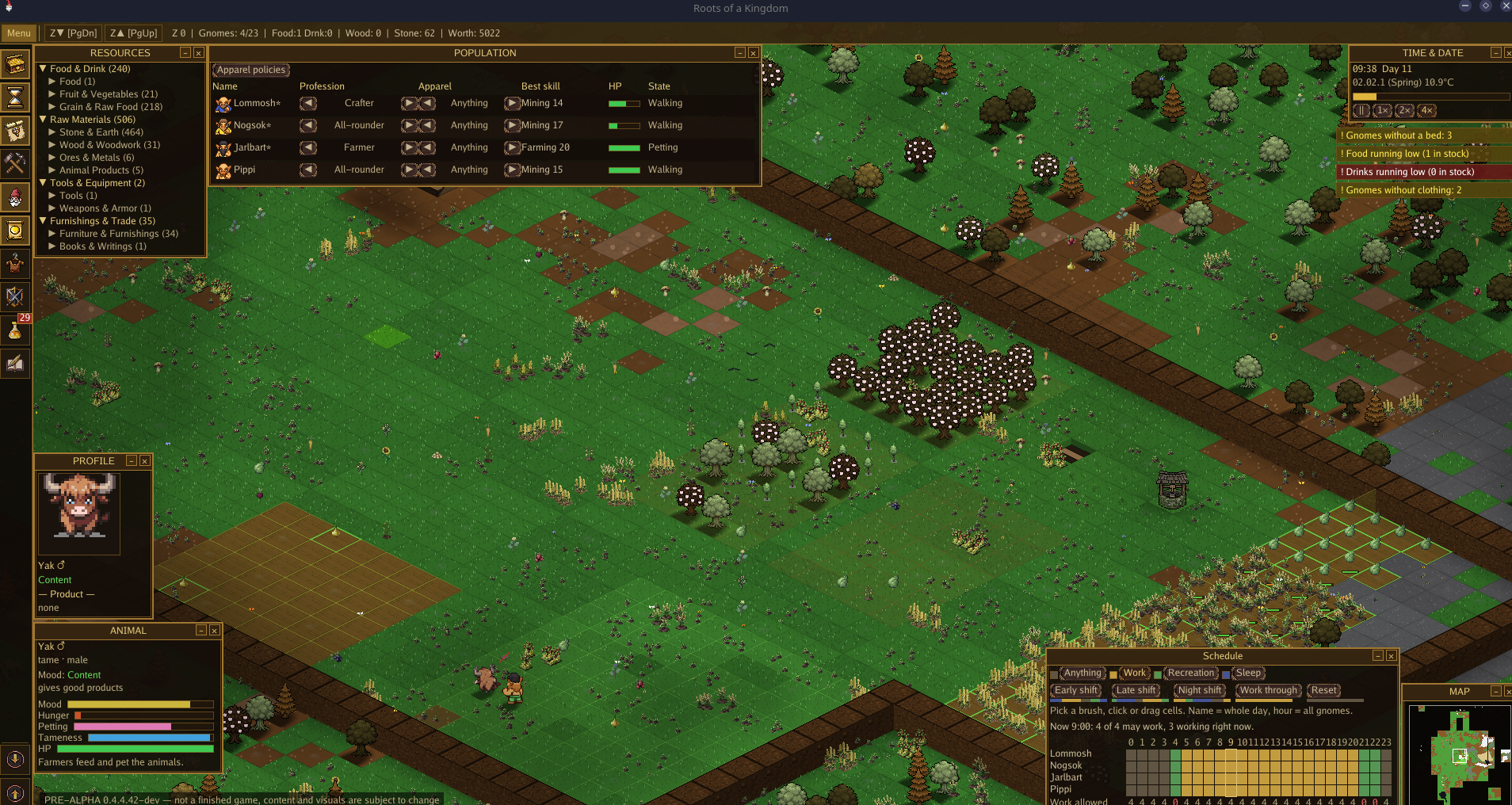
After 18 months in develeopment i finally reached the Alpha stage of my small colony builder. The game is, as some people will see, highly inspired by the classics of this Genre most notably Gnomoria. 

In its current stage the game is playable and, hopefully, enjoyable. The Demo is time limited and some late game elements are missing.. but besides that it is the very same game that will end up soon on Steam after a Kickstarter campaign.

The game is a solo project and still under development although i will focus, at this point, mainly on Balancing, Quality of Life and Eyecandy polish. 

-> Devlogs: https://itch.io/t/7097252/roots-of-a-kingdom-devlog-open-alpha


Here is a very recent video of the game:

Have fun!

I just released the 0.5.0 Demo for Roots. 

https://magetec.itch.io/roots-of-a-kingdom-kickstarter-demo


From this point onward until i finally got my SteamID and the Kickstarter campaign starts i will mostly focus on balancing, look&feel and maybe some quality of life. I consider most of the basic stuff done but i am still open to suggestions :)


Here is a small changelog:

What's new in 0.5

Big new systems

  • Campaigns: squads march across the world map to occupied regions, fight
    it out by gear, morale and numbers, and free them. Freed regions pay tribute
    and soften raids until enemies take them back. The dragon's hoard is the
    hardest target.
  • Waterworks: the water wheel draws power from the water around it and
    more in a current. Sluice gates hold a channel back or release it, so a
    lever floods the moat. Fields near water are irrigated (+25 % growth) and
    weather droughts. Streams now rise from springs that never run dry.
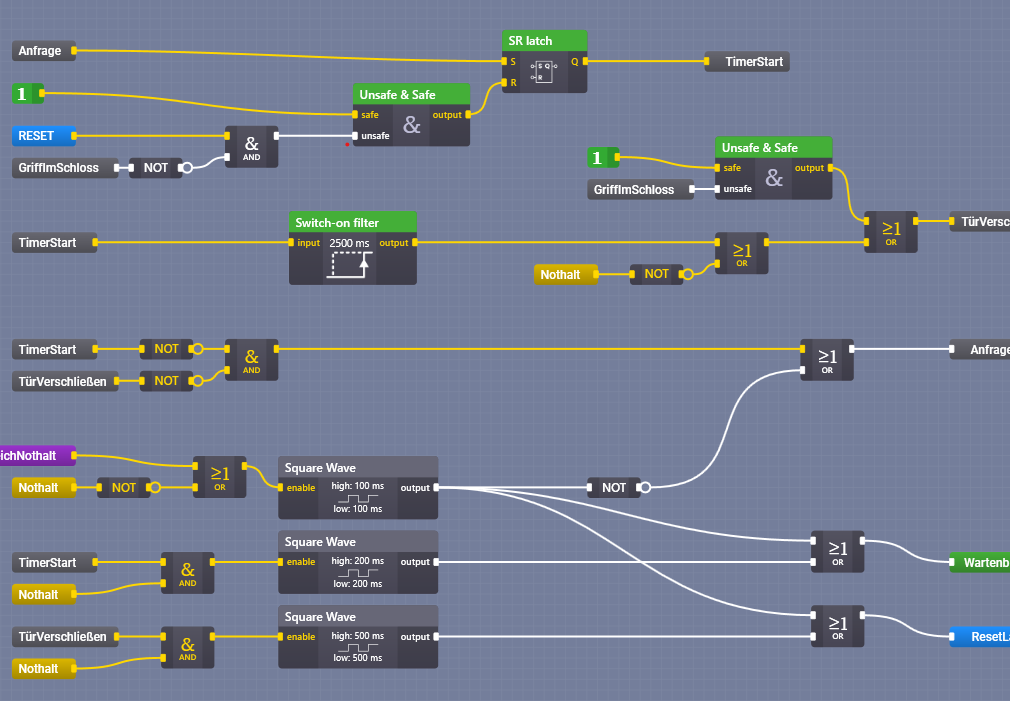
  • Automation: enemy, water-level and stock sensors, a time switch, a pulse
    timer and logic gates (AND, OR, XOR, NOT, latch) switch mechanism networks
    on their own. Gates shut when raiders approach, pumps start once the water
    is deep enough. Hover an element to see its circuit.
  • Fortress building: drawbridge, portcullis, arrow slits, wall walks,
    moats and crewed ballistas that need bolts from the stockpile.
  • Natural disasters with warning: spring floods, summer droughts,
    earthquakes and lightning fires. Wide halls without pillars creak and cave
    in.
  • The deep: below level −31 lie mushroom forests, crystal grottos and
    underground lakes with platinum and mithrilite.
  • Monuments: Ancestor Stone, Heroes' Grove and Star Hall, built in
    stages, raise kingdom value and calm raids.
  • World map and outposts: expedition targets with their own loot and
    danger; after three trips an outpost delivers daily.
  • Boats: two docks on the same water form a ferry; gnomes row across and
    fish from the boat.

Colony management

  • New-game wizard in five steps: world preview, climate, difficulty presets
    with sliders, founders with portraits and specialities, kingdom name,
    crest and ruler, scenarios, ironman rules, shareable setup code.
  • Royal orders, decrees (rationing, overtime, feast days), plague spreading
    by proximity, a chronicle book with Markdown export, an end-of-game summary.
  • Box selection of several gnomes, job overview window, production-chain
    window, walk heatmap, cross-section view, build preview that marks invalid
    tiles.
  • Tools and torches as equipment; gnomes move into private quarters.

Interface and looks

  • Living main menu with the demo colony, new load screen, settings in tabs,
    key rebinding with conflict check.
  • Nearly all terrain, plants, trees, goods, tools, furniture and workshop
    props are now drawn procedurally; soft ground transitions, snow caps and
    moss, waterfalls, felled trees topple, fireworks, photo mode (F3), idle
    poses, varied body sizes.
  • Deep water can no longer be waded; lakes are bigger.

Devlog suplemental


Done for today:

Let me start with a controversial sentence:

My name is Martin. I use AI.

As of this point i guess that 50% of everyone ever watching this thread has abandoned it and 25% of those are actively trying to block me from ever releasing a game now.

Jokes aside.. yes. I have been using AI for a while. As i stated in my initial Posting on this devlog i am working on this game now for almost 1 1/2 years mostly using placeholders and very simple colored primitives like circles, square and so on.

When most basic stuff (see the brain post further above) was done i went ahead and created most simple sprites to be able to distinguis several things that before were harder to see. Debugging is a problem if you dont know what you see - then again.. this was also the time i added a (dev version only) RPC server to the game to poll pretty much everything and to steer the game from the outside - giving me, much later, the ability to create videos..

The further development came along the more was the need there to distinguis items, entities and so on. At first i began to use sprites and textures available for free but, as most of us know here, a wild assembly of free stuff ends up being a mess. So arround easter i started using Pixellab to create sprites and textures for Roots to spend less time on searching for assets and making them work (tilemaps are a royal pita if you hvae different sizes of tetures, look bad if you scale them and so on). Using this AI service gave me the change to go from 50% time spending on Assets, 30% time of coding and 20% time to test to basically 60% coding and 40% testing - giving overall devolopment a major boost.

But here is the catch. While development got boosted and my protoype developed into a game way faster than i first thought i also had problems. Artifacts, Inconsistencies etc.. not as glarings as in using a bunch of free assets but maybe even more obvious as a single frame in an animation showed a blue shadow or certain textures looked awefully wrong.

Now that my game is nearing the finishing line I started phasing out AI generated sprites. With this post i can say that I removed about 80% of all generated content. I plan to finish this major task within a few weeks.


Anyway... now i want to talk about procedurally generating textures instead.

After getting rid of my pngs i didnt want to spend hours on creating the perfect floor tile and thought about generating these textures in game. After all i already have a procedurally generated landscape - which is, when looked at it at a distance also nothing but a bitmap. with each tile representing a pixel if you want.

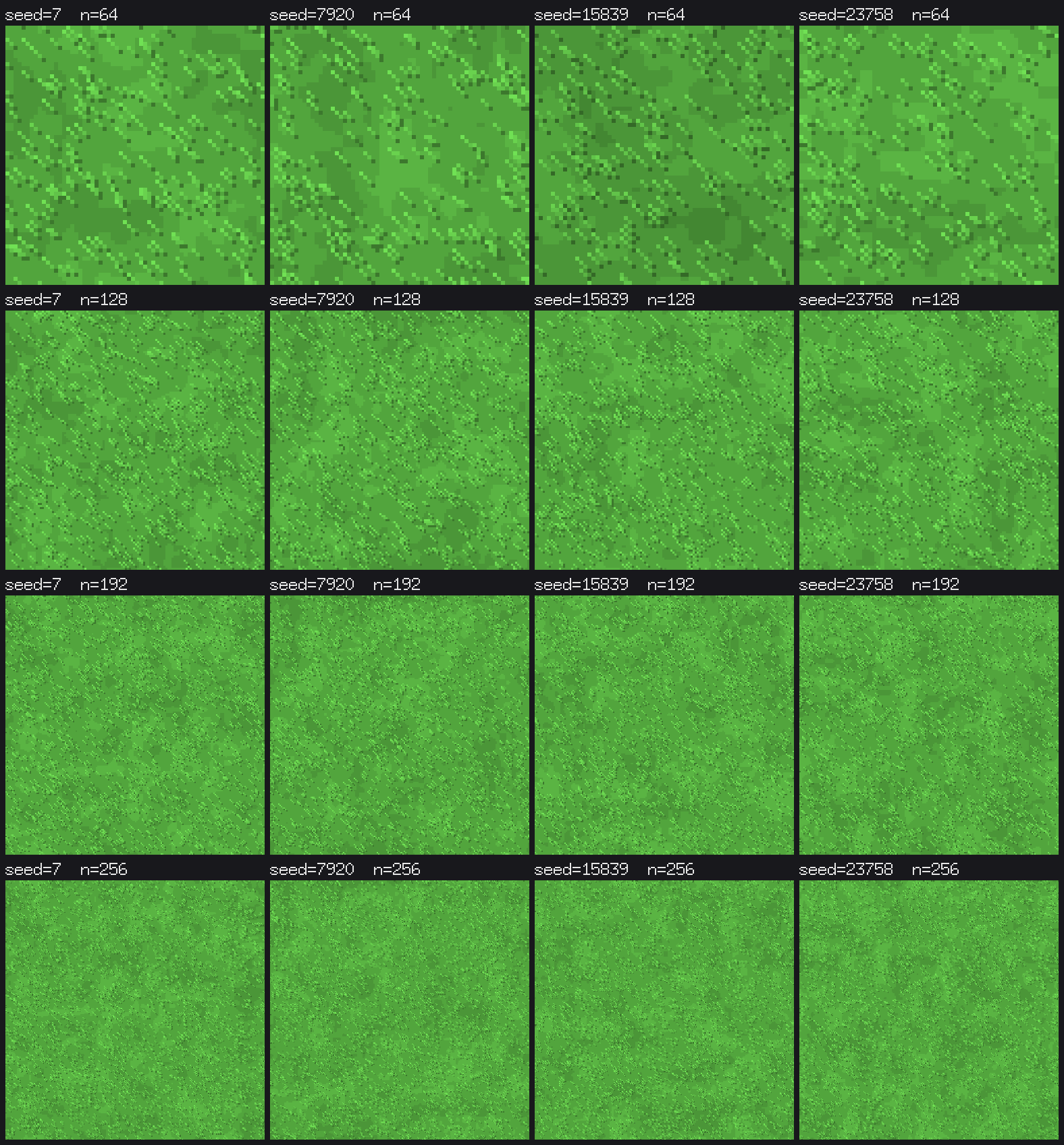
So i stepped back for a bit and created this simple function (example for meadows):


// procGrassTexture generates the meadow texture: patchy grass tufts (two
// noise octaves) plus many short blades that appear upright on screen
// (they run along the texture diagonal −x/−y). The result is grayscale;
// the green tint is applied later from the material color.
//
// seed selects the pattern, n is the texture edge length in texels
// (a multiple of procTexSize).

func procGrassTexture(seed uint64, n int) *image.Gray {
// k scales feature sizes and counts so a larger texture keeps the same
// look instead of getting finer detail.
 k := n / procTexSize
 img := image.NewGray(image.Rect(0, 0, n, n))
// Base layer: tileable value noise, coarse octave (4·k cells, 60 %) mixed
// with a fine octave (16·k cells, 40 %; different seed so they don't align).
 for y := range n {
  for x := range n {
   nv := procValueNoise(seed, float64(x), float64(y), 4*k, n)*0.6 + procValueNoise(seed^0x9, float64(x), float64(y), 16*k, n)*0.4
   // Quantize to a few brightness steps (12 gray levels apart around
   // mid-gray 128) — gives distinct patches instead of a smooth blur.
   img.SetGray(x, y, color.Gray{Y: clampByte(128 + math.Round((nv-0.5)*3)*12)})
 }
}

// Blades: deterministic RNG so the texture is identical every run.
rng := procRand{s: seed ^ 0x6a}
for range 220 * k * k { // blade count scales with area
 x, y := rng.intn(n), rng.intn(n)
 l := 2 + rng.intn(2) // blade length: 2–3 texels
 // Dark root texel where the blade meets the ground.
 img.SetGray(x, y, color.Gray{Y: 92})
 // Blade body: step diagonally toward −x/−y, which projects to
 // straight up in the isometric view; brighter toward the tip
 // (152, 164, 176). Coordinates wrap so the texture stays tileable.
 for k := 1; k <= l; k++ { // note: shadows the outer k (scale factor)
  v := 140 + k*12
  img.SetGray(procTexWrap(x-k, n), procTexWrap(y-k, n), color.Gray{Y: uint8(v)})
  }
 }

// Shared post-processing step for all procedural textures.
finishProcTexture(img)
return img
}


This code, and the variants for sand, snow etc, allow me to create, on the fly, nice looking textures with varying results.

Although i already used some procedural stuff to mask the textures (adding grass to meadows as overlayed texture) i wasnt really happy about the checkerboard look. Now tith this code i can create really nice effects stitching the terrain togeather organically. I have also added a "blend" feature to not have hard edges between different kinds of floors but to have sort of transitions.


Long story short:

AI is not a curse. It is also not a blessing. It is a tool to speed up development if you want it, but it is not a way to make everything perfect. To me, AI is like using Unity, unreal or Godot - you can use tools to speed up parts of development but you cannot replace the craft behind it. And as long as you know how to handle your tools and not rely on them to do your work AI can be helpful.

Well.. Luckily it is not that early... I've been working on this for more than 15 months now and have my set of local tesers who gave it a shot already. This is more like a public alpha phase. But thanks for the siggestion with the thee beats :)

Ok... i am sleepy, have a headache und a days work ahead...


But i am done:

No idea if it stays part of the game as it may be a bit distracting, especially when in 4x speed... but well... it is a nice excercise of too much time and too little to do.

I dont live in the USA. But still this is going to be a long night, even in Europe. So much can happen tonight that i am loaded with Coffein and ready to work until i hear the first results..


That being said.. what am i going to work on? At this point Roots is at a very much finished point. Pretty much all that i wanted to have finished before starting my Kickstarter campaign is now finished.

Shameless self ad: https://www.kickstarter.com/projects/magetec/roots-of-a-kingdom?tab=prelaunch-up...


Everything that is open at this point is mostly what is written in the stretch goals or too much for one night anyway. I started replacing the GenAI textures a while ago and while there are still some left i am tired of nudging pixels arround. I will continue this for a while when the game is closing in on its 1.0 release anyway. 

So.. what can I do... 

Today i went through a somewhat abandoned part of the factory I work on my dayjob. I have always had a soft spot for lost places and since this is where i work i simply went through some barred doors and looked arround. Imagine, for a minute, a factory some 80 years old, build in the very dynamic times when Germany just came out of WWII and, at least this part, went into the soviet union. The building was from the early 1950, the machinery, as far as i can tell, last checked by some maintanence crew in the late 1980s, the computers.. wait! Computers! There were some very old and very dead parts of computers scattered arround. 5.25" floppys all over the place and some old style CRTs on rotten tables with at least one housing an empty birds nest - stuffed with cotton bandages which packaging sayd "proudly made in the German Democratic Republic"

This kind of abandoned. 50m from an active factory with somewhat modern 2000er stuff inside. 

Seeing those floppy disks brought me back into my childhood and my first computers a C64 and then a shiny Amiga 500 (yet with 3.5" floppys). When i was not even 10 years old I already loved to use my trusty old Amiga playing the games which became legends later on. Shadow of the Beast, Giana Sisters, Elite and so on.. but one particular game followed me through the decades. Might and Magic 2 - no. Not Heroes of MM.. the real one. 

Might and Magic II had a particular feature that blew me away at that time: Full 3D gameplay with an open world. I played it on the Amiga 500, on the SNES and even later on my PC... and some times i dust off my Disks/CDs/DVDs/Usb drives that contain my old copy of it and I enter Middlegate once again.

So.. this for the Nostalgia. Why do write about this? Simply because it brought a thought to my head.. what about Raycasting? 

Raycasting is a very very basic method to create pseudo 3D on weak hardware. In short terms: You have a grid and a movable object. The object casts rays into multiple directions (well, into those you can see) and once the ray hits a wall on the grid you measure the distance and draw it in front of a camera scaled to the distance. This is basically the same effect you have in Wolfenstein and similar pre-Doom games that were using 3D. 

So.. my game is using a tile engine - or in other words, a grid. My gnomes have eyes and i have some time to spend.. I wonder if i can get a POV done until these midterms are over - and if i get a bit more "polishing" done on the "3D" than just having a solid-color gorund, a solid color "sky" and some solid color walls.

Here is an excellent in depths tutorial on Raycasting and how it is done:

Well... things dont always run according to plan...  as in Development so ingame...


Update to 0.4.5

Download the Demo: https://magetec.itch.io/roots-of-a-kingdom-kickstarter-demo

What's new in 0.4.5

  • Animal companions: tame a stray dog and it follows its gnome, barks
    when enemies approach and helps soldiers hunt; it eats meat or dog biscuits
    from the kitchen. Tame cats and honey badgers keep the nearest field (crops
    around them grow 20 % faster); cats catch mice there, honey badgers eat
    honey. Cats come in several coat colours.
  • Livestock: the armadillo (plates for armour) replaces the pangolin,
    the swamp dragon looks like a bearded dragon, bears cannot be tamed.
    Animals walk in stages with their own pace and short rests.
  • Beekeeping, compost, mushroom cellar: beehives turn nectar plants and
    orchards into honey and wax and pollinate nearby crops; the compost heap
    turns waste into fertiliser (+30 % growth); mushrooms grow under a roof
    regardless of temperature.

  • Lift: a shaft block like a staircase, four times faster than stairs;
    pathfinding prefers it.

  • Expeditions report daily events (camp, trader, ambush, storm, hunt) and
    show the loot on return.
  • Fire: sparks from fire workshops first make wood smoulder (early
    warning); the fire post keeps a bucket brigade ready within 12 tiles.
  • Sickness: herbal tea cures illness, the infirmary triples recovery.
    Starving gnomes eat raw crops, eggs or meat.

Colony management

  • Warnings window with badge: missing beds, low food and drink, hunger,
    naked, idle or sick gnomes; a click jumps to the ones affected.
  • "Why is nobody working?": the idle reason knows schedule, clothing and
    missing material; construction sites name the missing part and its chain.
  • Stockpiles: filter templates, low/normal/high priority, crates and
    barrels for bulk goods, expandable goods list with locations and demand.
  • Workshops: pause and resume, recipe search, only unlocked recipes,
    "until X" counts all quality tiers, automatic orders accept any material.
  • Undo (Ctrl+Z) for the last designation, Urgent tool (U), schedule
    templates (early/late/night shift), sortable population window, own room
    claimed automatically.
  • Hauling in batches (hand 3, wheelbarrow 10); levels count towards haul
    distance.

Interface and looks

  • Analysis views (I): room value, light, reachability, fire risk.
  • Camera follows a gnome (G), camera bookmarks per level, pinned goods with
    trend and days left, event log with 120 entries, danger autosave before
    raids and the dragon.
  • Speech bubbles, portraits, banner colour with coat of arms, scaffolding and
    cracks while building and digging, floating yield numbers, hover outlines,
    ripples on water, light and sight range when placing torches and guard
    posts.
  • New animated sprites for wolf, golem, cave insect, giant spider and all
    livestock; own sprites for the sunflower; workshop furniture in material
    colour.
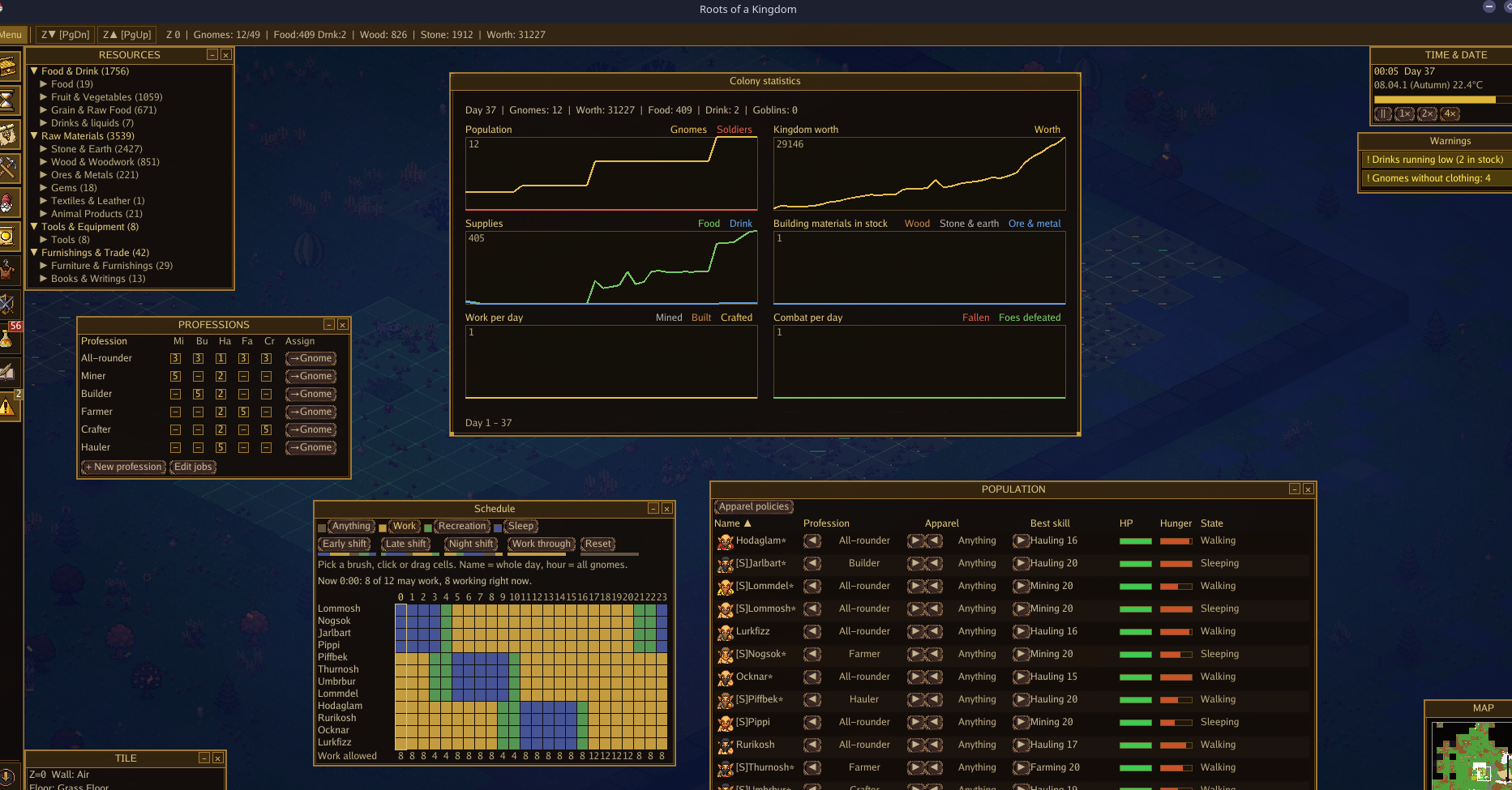
  • Statistics window with six charts.

Looks like you played a lot of Kingdowns games in the past. I like the look of it and am curious how this turns out.

This might become a very interestering game :)

A while ago i wrote about my deterministic testing and that i can compare scenes to see changes and especially if logics fail and so on. This also leaves me with the interestering option to show side by side comparisions of the very same scene through various versions. 


In the past days i worked a lot on the brain again to optimize building structures. Mainly adding new "thoughts" about where to fetch and where to bring material.. but also trained the gnomes to use tools, namely, a wheelbarrow. Until now gnomes got the job of building a wall tile, went to the stockpile, took a single item brought it to the wall went back, hauled a second material item (a wall needs two of the same kind) brought it to the wall, dropped it, checked if there is a job nearby and might have started hauling stuff to the next wall tile rather than building the one it brought material to. 

This, of course, is not very smart. Another gnome might have picked of the wall building job and created that very wall.. And with more than two builders it may lead to the problem that they block each others way by building walls or walling other gnomes in creating even worse situations.. 

So now gnomes try to bring material to as many construction sites as they can and "check" the order of tiles to build. This works way better than before, but still leaves me some room to optimize and some headache..  But to make things more fun i added the wheelborrow to the game allowing a single gnome to carry 10 items at a time... 


Anyway... here is a side by side comparision between the game today and the game a few weeks ago... there was a lot of eyecandy changes... and some logics stuff.. 

Have fun:


https://magetec.itch.io/roots-of-a-kingdom-kickstarter-demo

That is not a bad idea. Thank you :)

Well... after reaching my 0.4 Milestone i started to professionalize my changelogs and workflow ... and packing them into my overall project documentation. 

Since i am now at a point where i can basically start the Kickstarter Campaign and my Steam Store page at any given time - still waitinng for Steam to check my credentials - i had to get into track and work on the project the way my dayjob mostly expects it from me. 

Therefore this small devlog will get into a deeper detail on how this hobbyist project differs from project management at a larger company... I guess that this may be interestering to a few devs here who havent worked in "the industry" before.. so let me start here..

Overall in a big company you dont have as much freedom of choice that you may have at home. Be it ISO, DIN or whatever law-level rulebook you have follow, it dictates what you can do, use and - sometimes - think.

For example: When i work on Roots i use a Linux x64 Arch system to code. My CI runs on a raspberry pi4 with various cross compile options and stores the files on two NAS and offsite.  My main tools are VSCodium, LibreSprite, Kate and others.  VSCodium as it is, at least to me, a cleaner version of VSCode. LiibreSprite is a dead siimple sprite editor and Kate.. well.. Kate is somewhhat of a swiss army knife for Roots as it can handle Code as well as large JSON files. Sure VScodium would work, too.. but sometimes kate is just handier. 

So as you can see i use a lot of open source tools just on the coding site.. left alone my home Git management as well as the NAS and other stuff running on PIs, old micro computers and in one case a repuprosed router. Or in other words: It is wild. 

At my dayjob things are utterly different. Although, after spending a decade at my company, i have a certain degree of freedom it is more of a silvery (no. not gilden..) cage. I am bound to IT safety requirements, meaning thhat i have to use Windows 11 (or whatever windows is currently the one and only up to date system..). I absolutely must use Visual Studio and must not circumvent any of it. basically this boils down to certain decisions on manegment level. See.. I mostly work with the Beckhoff Twincat3 PLC eco system. And although Beckhoff is opening up to more, lets say, open source friendly ways it is still using microsofts Visual Studio as their one and only IDE. Since my company chose to use Beckhoff PLCs i have no other choice than to use that clunky piece of software for stuff that VSCode could do as well.. or, for that matter, any texteditor and a feww batch fiiles. (I skip the part of the addons like Motion etc.. that sure makes VS a requirement and cannot be substituted easily.. but that is beyond the scope of this devlog). And since i work with machines that pose a serious threat to people, imagine cranes moving 5+ metric tons on  free X/Y/Z axis)  I have to adhere to a ton of law-level guidelines and rules. This dictates using safety equipment and therefore one or more) safety PLC(s). These cannot be programmed freely as each and every module has a certain certification and therefore this has the consequence that you have to wrap your head arround the thoughts that this company put into creating these modules. In 9 out of 10 cases you cant just go and do whatever you think would solve a problem but you have to play a puzzle to solve your problem with the pieces given. In a way it is a kind of mental Tangram. 


Playing Tangram

You only have oddly shaped pieces and want to build something beautiful - with no idea how to twist an turn those shapes at the beginning. 


Once your Software is done, the machines run as intended you have to document everything. Since  I live and work in the EU this documentation has to also follow a set of rules. At the beginning of a project i have to sign forms and use it as sort of a guideline marking date of each reached - we would call it - milestone and also getting signatures by union(s), supervisors, H&S staff and so on. .This whole programm is extremely structured from start to finish.  And it also dictates how changelogs hhave to look... and since i now enter a phase with roots that come to a level of my projects at my dayjob i have to start going this way as well - not to make things more complicated but to make it more transparent for the end user. A good changelog and documentation is nothing you do for yourself - at least thats what my supervisor says.. no.. it is meant to be handed to the customer - and to safe oneself from questions. RTFM may be rude.. but the better your manual is, the less answers you get and the more time you have to spend on important stuff. 


And now, without further ado here is my changelog for Version 0.4.4.11:


- **Fishing**: the fishing pier can only be placed right next to water. The new Fishing skill catches raw fish (slower in winter); the kitchen fries it or cooks a fish stew.
- **Expeditions**: send a squad of two or more gnomes off the map for four days. It comes back with loot, sometimes injured or short a member, and now and then with homeless gnomes who join the colony. 
- **Fire brigade**: fire spreads to trees and wooden walls, rain dampens it. Civilian gnomes fetch buckets, fill them at water or a well and put the fire out, but stay clear of enemies.
- **Starting skills**: founders bring a speciality (main skill level 5, side skill level 3), newcomers one random skill at level 4. 
- **Daily schedule**: a new window sets work, recreation and sleep hours per gnome and hour. During recreation gnomes only eat, drink, sleep and fight; sleep hours send them to bed even when rested.
- **Worn clothing**: clothing and armour wear out over time (shown in the character window). At zero the piece is gone; naked gnomes fetch the nearest garment from a stockpile. 
- **Apparel policies**: assign each gnome a policy in the population window and choose in the policy window which pieces and materials, colours, durability range and quality range it allows. Gnomes take off anything unfitting and fetch a fitting piece from storage; worn pieces keep their wear when taken off. Templates: Anything, Worker (wool), Soldier. Policies can be renamed (click the name, type, Enter); templates follow the game language until renamed. One policy can be marked "for soldiers": soldier mode switches to it and back automatically. Open with **O** or the sidebar;  the character window shows and cycles the policy. A naked gnome without permitted clothing shows a crossed-out shirt above its head. Dyeing a worn piece keeps its wear.

Alright...  Although i wanted to write a lengthy post about how happy animals create useful ressources and badly treated animals create useless or bad items i skipped this one for the simple reason: I spent all week on a ladder connecting my laptop to various access points and rewiring a whole factory and for today i am fed up writing stuff ;) 

Luckily that meant that i had to spend days in a Hotel with nothing much to do than to sit arround, stare at a wall and have my laptop in front of me... so.. i did a bit of eyecandy work and prepared some documentation for the player. 

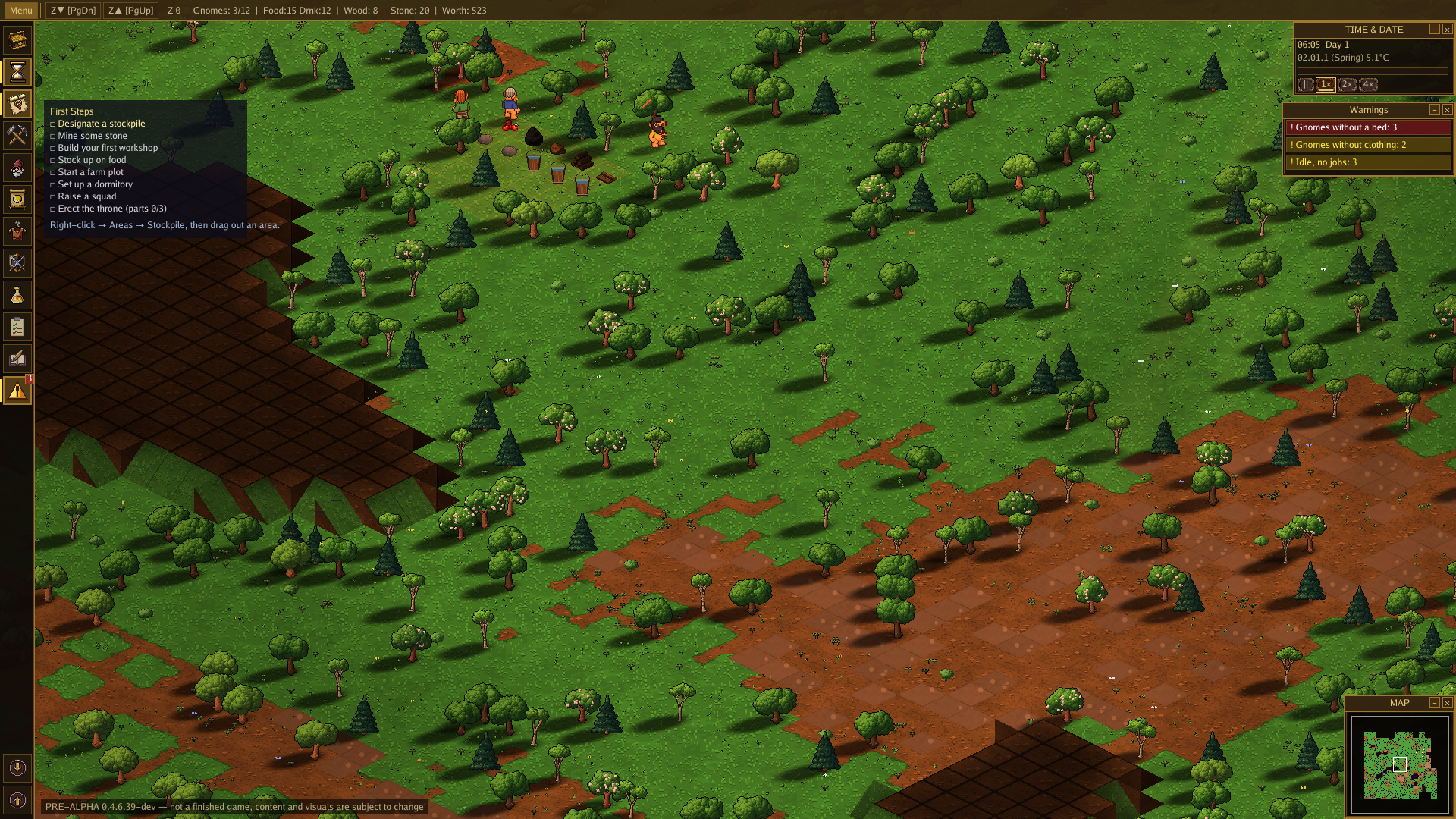
So first things first.. here is my newest gameplay demo scene: 

And second.. i created a small document (see previous post) on the economy of the game that will be uploaded soon to the itch Website.

On other news: Steam still takes its time to review my files.. it is now 18 days and counting...

*Mine, Build, Reign, Try again.*

I tpday bumped the Version to 0.4 since... stuff got a bit wild in the past days. 

So I will split my Devlogs to several topics each. First of all... let us have a look at the economy: 

For the past few months the economy was pretty much stable..  I created 52 raw materials  for 149 products  using  205 recipes in 20 workshops.

But the most complex thing to build was the throne.. it consisted of just 3 steps in a tree: get Wood, get Stone, get Gems. Cut, polish and attach -> have throne. 
This was not really a challange. YOu could basically build all workshops on day one and let your Gnomes create each and every available ressource one after another building the next workshop whenever possible. 

Old production Tree for "Wood"

Like with the brain an Overhaul of the whole thing had to be done.
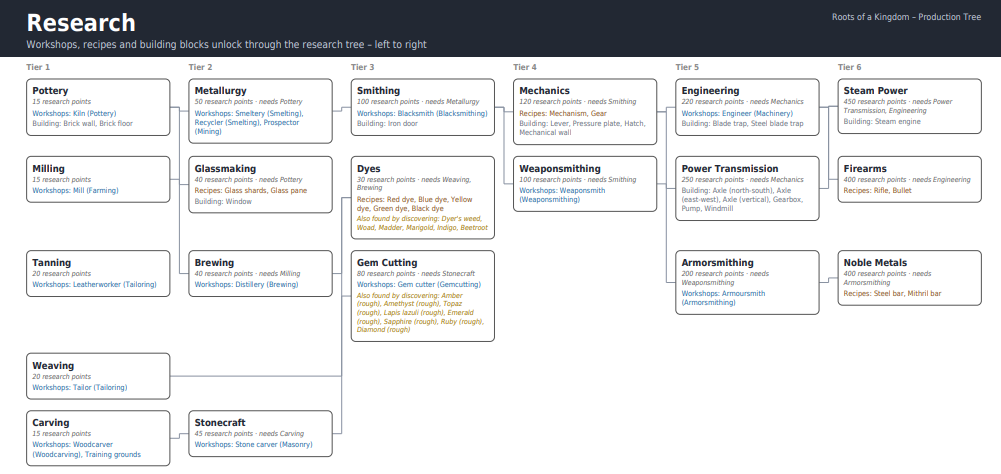
First of all.. i want(ed) to prevent players from setting up the whole chain of workshops on day 1 so i had to create a "tech-tree" to unlock more complex workshops and reciped later on. I took a lot of inspiration from the complex but simple to use tech tree in Kerbal Space Program (Shoutout to my old QA tester friends!). To unlock a new technology a gnome has either to find an old textbook in the ruins of other settlements and study it or analyse plants, unknown mechanisms and so on.

This added, to my simulated runs (see the Update on the deterministic gameplay simulations) just about 5% to 10% of game time but adds a whole new system to the game as well as a neat little challange for the player. Second.. the production chain was too simple. Have stones create chair is... too simple. (and uncomfortable! I dont want to start having analogies put up to the KENNEDY center with its imaginary marble arm rests ;)). Anyhow... now a char consists of  wooden planks and sticks.. so well.. it is not exactly complicated but.. better still. 

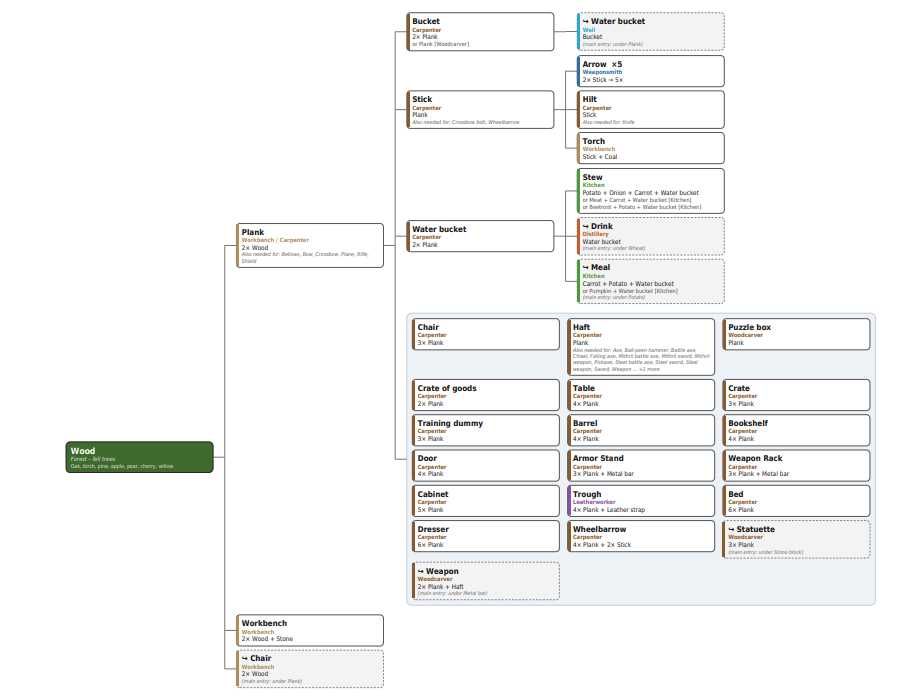
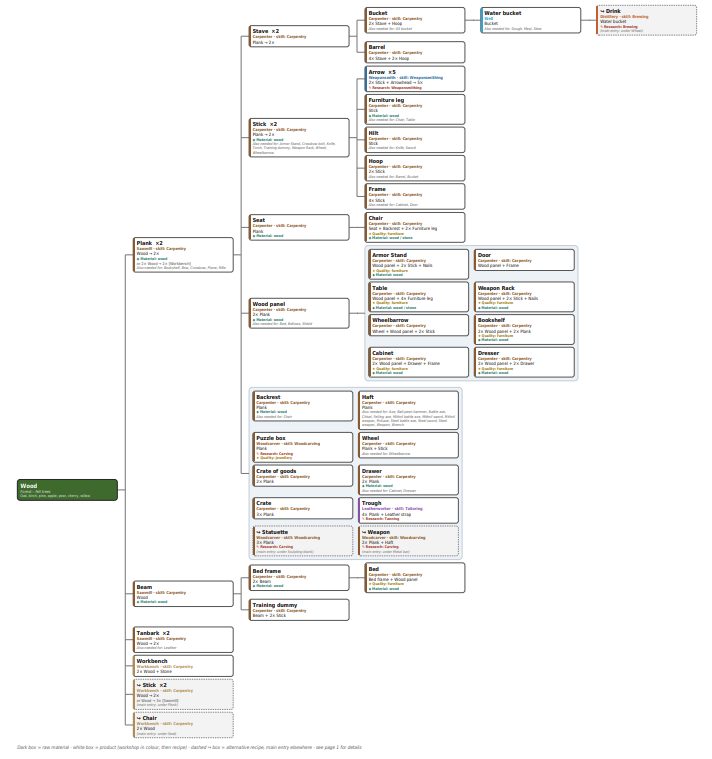
Now the tree for Wood looks a bit different: 


It is not much more complex but the player has multiple ways to build one and the same item and also several craftable ressources that can be used on various recipes.. 
My goal was not to make the game hellishly complex and a grind to play but to add complexity without increasing the amount of time to finish the main goals artificially. 


Since it is almost 12pm and my dayjob calls me to be there at 6am i will stop this devlog at this point with a small sneak peek at what is to be expected from the next posts: Animal Husbandry, Quality and Skill, Sour milk and moths.

Hi there, 

After spending yesterday with the brain salad surgery of my gnomes i was doing some polishing work today. Sometimes you need to change hard stuff to "feelgood" tasks from time to time. Although it is, i think, too early to polish stuff, it was now good to plan the next things and make the overall look and feel nicer. 

So.. today i spent some time on make the world more "alive". While make things run arround on a grid is simple and having "idle" animations for entities is not bad things can pretty sterile. 

So.. with some image manipulation you can achieve quite a lot.. 

Basically you can slice a sprite and move those slices indipendendly.. this creates the illusion of "wind" if you do that for plants.. and it is quite cheap to achieve (CPU/GPU). 


Please dont mind the black area.. i have no idea what the driver or wayland update changed.. but i cant focus on a single window at the moment.. 

Also... the game already has had some sort of a light/darkness system. I basically share the same system for the "fog of war" and figured it would be easy to add "fire" to the game lighing up areas.. and when there is fire there should be smoke... so...


I render at the places where "fire" happens just some smoke particles (Note: No particle system.. i just draw a fixed sequence of white circles of various transparency values).

Last but not least i was able to finally give the mechanism System a major push by overengineering the whole thing. In the factories i program i have to define circuits, literally and methaphorcally. A circuit can be a PCB with bird seeds and chips on it.. but also dozens of meters long cables running through a plant containing exactly one signal (or network connection) from one source to one machine. At times you have to add junctions, some times you have to bridge over other cables. You have to distribute things and combine signals... and i really cant let go of my dayjob there. 

So at this point i have to decide how far i want to go: Is it ok to do everything that, for example, Gnomoria did... or will i face a possible future that has someone in store that is going to run Doom on my poorly animated mechanisms? 

We will see....

On the Evolution of the brain.. the Gnomes brain.

Before I started to work as programmer I studied paleontology. No joke here.. I was one of those guys who are said to use a toothbrush in the desert to scoop up some old bones.. yet in my case it was a large motorized saw with a blade to cut into stone and mostly very very old trees. 
Anyway.. evolution is still one of my favorite topcs and sometimes a game can be closer to live than you'd expect. 

In this case we can talk about a gnomes brain. 

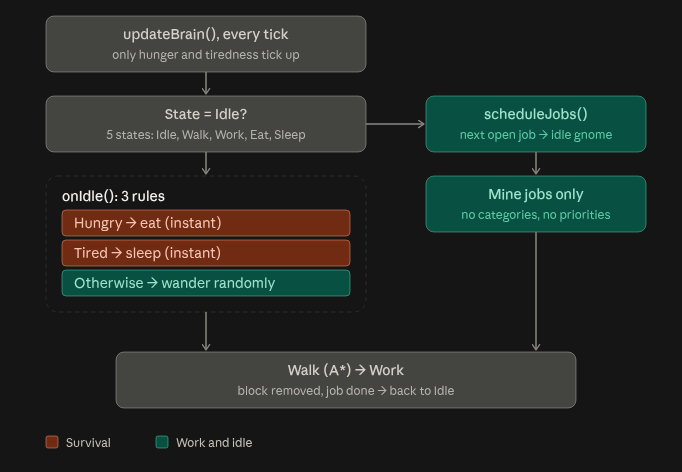
The proto Gnome, barely "alive" enough to have a single need: hunger has to do nothing more than Eat, find food, sleep and maybe dig into rocks....
Therefore the "Brain" looks quite simple:


As you can see the Protognome has only a very limited set of rules working a single job on demand and otherwise either idle, eat or sleep. A perfect member of society ;) 

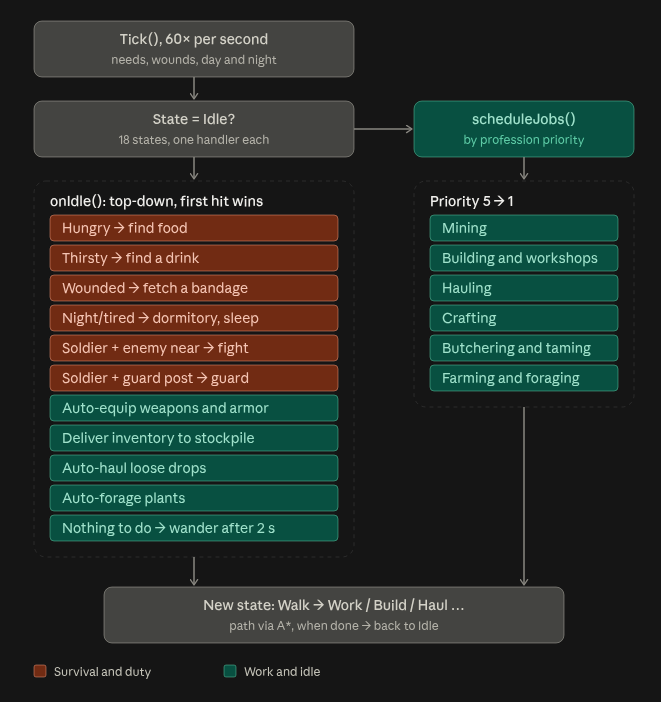
A few months later, lets say in the "Hunter & Gatherer" phase of my Gnomes evolution their brain has heavily developed: 

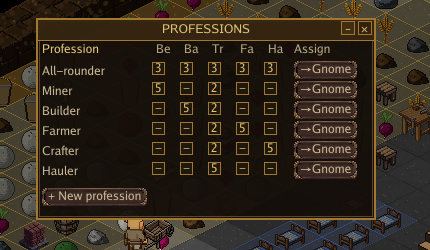
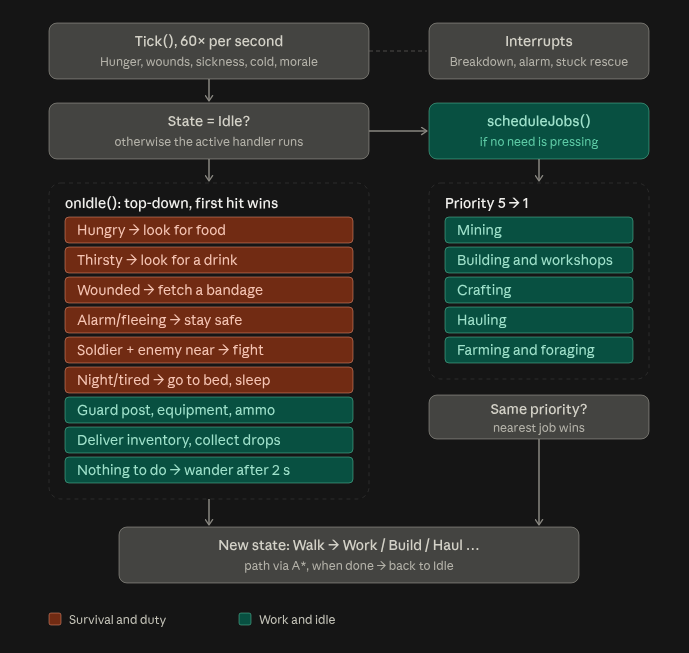
Instead of just fighting for survival we now have several jobs and no longer "rules" but priorities. Survival always has a higher priority than finishing work (yeah.. no longer the perfect member of society..) but if possible work has to be finished first anyway.  Job scheduling is handled outside the brain through the player that can assign certain priorities based on a Gnomes profession:


This way the player can somewhat control the way jobs are handled without meddling with the brain of each gnome seperately. 

Keen eyes may have spotted that, also, i no longer update the brain on each tick but 60x a second. This is a performance imporvement and also allows the scene to fully "settle" before another choice is made. 


Now in the medieval stage where i currently work with them only minor changes came up:


There is the minor refinement of adding a "distance penalty" to jobs. If jobs have the same priority (see, for example the All-Rounder) the closest job is what a Gnome will take. This prevents, for example, hauling jobs that happen dozens of tiles away while mining on the next Tile is marked as a job. And the major change is the "interrupt" system allowing me to "interrupt" whatever a gnome is doing each "brain tick". A sleeping gnome, without interrupts, might be eaten by a wolf or a crafting Gnome wouldnt notice that he is starving to death.. so interrupts are important to keep things somewhat sane.

Well.. let us see where evolution leads the little Gnomes next.

Hi, Thanks :) 

The biggest challange is, to me, finding the neccessary time. 

Organising some project like this not that hard to do. I am using a project management software (my own) for my dayjob and have my way of organising projects anyway. Keeping track of a few ideas, features and the tasks connected to that is not as hard as it seems. The main thing when organising is to have a plan at hand, not just Plan A but Plan A, B, C and if needed D to K. If you feel like you are starting to become spontanous about decision making you should really stop working and start planning again. That is my best advice after years of professional project management ;) 

The development itself is not as hard as it seems. As i started from scratch (except for the engine, Thanks Ebitengine Team!) i had all the possibilites that i needed. This is why i never really liked using Unity and other major engines: You have to adapt your way of thinking, your way of desinging to their workflow or submit to limitations because you dont want or cant do that. If you are very familiar with such engines it might be easier to do whatever you want.. but for me it was always a bad experience using this kind of programs for larger software projects. 

(1 edit)

Although i was prpgramming in pretty much every higher level language since the early 90s I have very much switched to PLC programming in the past years. With that change i had to unlearn a lot of stuff i have done in the years before and completely rethink testing and verifying.

Since most people here are not familiar with PLC/RealTime programming, even though hardware like the Arduino and the countless ESP boards might have brought that to hobbyists.. but thanks to the Arduino team this hardware can, and in most circumstances is, programmed like any piece of software for the PC.

Anyway... in real time programming your code has to follow a "flow" from start to finish. You normally dont react to events, you basically have no parallelism and whatever you do the code should be deterministic. That means - if you ever have to stop the execution of the code you have to be able to fully understand how you got to that point and predict how it goes on from there. Therefore a lot of programs for PLCs are built in the simple sceme (Pseudocode)

void main()
{
int[] all_my_variables;
 while(true){
  readallinputs();
  dothelogic();
  writealloutputs();
 }
}

There is very little branching. Most of code is organised into step sequences. Branching is most of time not in use at all.

So..

Why do i write this?

In normal programming people tend to use very little testing. Unit tests are pretty common these days and using languages like my beloved GO make it very easy to use them.. but there is only so much unit testing can do for you. You can check if certain functions return exactly the result you expect for a given set of parameters and while that is sufficient to test that single function your program may still misbehave because the expected result may not be what you need as parameter for the next function and so on.. Dont get me wrong. I love unit testing.. as far as i can tell RoaK has basically no function that is not unit tested but this is not an overall picture.

To those who still read this post.. PLC programming is mostly dont to program physical machines.. and now imagine a large manipulator - a crane - strong enough to lift a few metric tons of steel and concrete while moving 50mm/s and people working close by. You dont want to rely on unit tests only if you could endanger people. if you divide by 0 in a program you end up crashing it. If you divide by 0 on a plc and the plc is crashing you may end up destroying costly equipment and harming real humans. As a nice reminder: The unfortunate and costly fireworks at the first launch auf Ariane5 was basically a variable casting error..

So how can you test a program end-to-end without the fear of doing something very wrong? You simulate it.

For our machines we have simulation tools to fully simulate all sensors and actors and make sure that with any given set varables the code executes the way you want.

Why would that be of interest to game programming?

In a way we can automate quite a lot in our games as well.. we can simulate inputs and see the outcomes on screen. For RoaK i use this extensively. I have a hand full of maps, of scenes i build on the "Green acres" and saved them in a known state. As it is pretty simple to do so on a city builder i have also added a rigged camera that moves along a known path and toggle actions as if i was using my mouse. That way i can precisely see an ingame scene and see if i have introduced game breaking changes. That is why my "PreAlpha" Videos always show basically the same sequence.. just with changing content. Sometimes there are more workbenches, sometimes you will notice lighting changes and so on..

But if i cant make it through this short sequence because some major screwup happens I know something bad has happened in the code.

I know that was a lot of writing for a simple statement on how i test my stuff.. but since this board should not have all too many PLC programmers i wanted to share the reasoning behind my design choices and maybe someone here might find it enlightening and useful that there is this approach.


Some evolution of the same sequence: 

0.1.0:

0.2.0:

0.2.5:

(3 edits)

Roots of a Kingdom is a colony-building game inspired by classic games like Gnomoria, RimWorld and Dwarf Fortress. Mine deep into a procedurally generated world, grow your own food, craft hundreds of items, build workshops and defenses, trade with neighboring kingdoms, and keep your gnomes alive through changing seasons and nightly threats.


The game: https://magetec.itch.io/roots-of-a-kingdom-kickstarter-demo

The campaign: https://www.kickstarter.com/projects/magetec/roots-of-a-kingdom?tab=prelaunch-up...

Steam: _pending_

Youtube: https://www.youtube.com/@RootsOfAKingdom

BlueSky: https://bsky.app/profile/rootsofakingdom.bsky.social

What happened so far / Game design (History...):  

Back in August of 2025 i began working on a small prototype of a colony sim (well.. i started even earlier on its predecessor oof just simulating entities on the console..) by drawing yellow dots onto green sqares on a simple grid. After a few hours those green dots moved arround and took blue quares into black holes. 

Working full time as project engineer and programmer for a large company i am familiar with setting up projects and developing not just programs but the full lifecycle of a product. Therefore i began making my plans on what i would imagine a colony sim to look like. And with every idea, with every thought i came closer to the games i played - like most of us do, when they start building something. I was inspired by those classics like Rimworld, Gnomoria and so on.. 

With that evolving plan I also had to make my first decisions on the look and feel of what i was going to create. Top down like Rimworld? Isometric like Gnomoria? Maybe directly going the 3D route? Pixellated? Sprites? Nice and simple drawn graphics like, for example, the Ultima series had? And what about the world? What about... 

So i spent days writing up ideas rather than programming but when i was done i had the basics on what i wanted to create.

An isometrics multi level pixellated colony builder with sprites and animations on a procedural, basically endless terrain..  The game should be sandbox.. but also should have winning conditions, it should get a high complexity but a low bar to start playing and hopefully enjoying.

Or shorter: I wanted to create a good game. What a surprise. 

Now with everything written down i went back to the technical stuff. Constraining myself right at the beginning by choosing the wrong engine or an obscure programming language would have been a death blow to a game later on: We all know that noone likes redoing everything just because an engine has to be changed... well... most of us. I am old enough to remember waiting for Duke Nukem Forever and Daikatana ;) 


Technical Stuff: 

Godot? Unity? Well... i played arround with Unity for ages but never really liked it enough to consider doing something serious with it. Godot is an excellent piece of software. You wouldnt believe how many HMIs in the german concrete industry are now running on GodotC#. But... i like coding. Plain and simple. Also... some things i had in mind are challanging to do with Godot (at least for me). So i went with the obvious path: 

Using https://ebitengine.org/ with my favorite programming language of the decade: GO.

Why using GO? 

Go has a nice syntax, allows creating a lot of stuff quite easily that other languages take way longer build (Ever tried to create a websockets enabled http server with C?). Also.. it is dead fast on compiling, allows cross compiling and has multithredding under its hood - especially useful when simulating a lot of entities..) 

What is Ebitengine? 

A great 2D Engine for Go. It took me maybe a day or two to get into it and start working on Roots.. I can only recommend it everyone to try it. 

In a way using this combination feels as easy as creating a python prototype software and as sturdy and performant as using C++.  In other words: It is just great.


Graphics and AI usage:

I used to create pixel art ages ago.. really... ages. Back in the find days of using Quick- and DarkBasic for games. So... very long ago. And although i can and still do that i tend rather to spend my time writing the game rather than nudging single pixel through multiple frames. That is why i chose to use Pixellab to assist me in creating assets during this early development stages. It makes a huge difference to just use a few minutes for an entire animation sequence rather than hours on it - especially while creating the code to use this animation.  But... despite its usefullness it is inconsistent in quality and style and feelswrong to keep using. That is why i want to phase out AI generated stuff by the end of development. 


Organisatory decisions: 

I am currently creating a kickstarter campaign. Lets be honest. The game is developed while i work 50hrs a week on my dayjob and some more thanks to be self employed. So.. what i need is time off to finishe everything and buy some assets. So.. I'd rather find people who want to support the game in the early stages rather than hope for people buying it in half a year or so. 
That is also why i created my Itch page and keep uploading demos of the current version. Once the kickstarter campaign is running and hopefully concluded with the project being fully backed i am going to start enrolling the game (also) to Steam. I think about releasing a DRM-free version here as well.. but i have not yet decided on doing this. 


With all that.. I'll keep you updated :)

Current state: 

I just released a first playable (tech) demo for my upcoming game "Roots of a Kingdom". 

It is basically a colony sim/survival game where you indirectly control a handfull of gnomes to create their own kingdom. You will direct them to dig for ressources, farm food, harvest various ressources from animals and let them build burrows, buildings or fortresses.. whatever you can imagine. 

The world is fully procedural and only limited by your computers hardware. The game runs on Windows and Linux and is currently in a somewhat playable state with a lot more to come in future. 


You can find the techdemo on my Itch page: 

https://magetec.itch.io/roots-of-a-kingdom-kickstarter-demo

As well as all the information on the upcoming Kickstarter campaign:

https://www.kickstarter.com/projects/magetec/roots-of-a-kingdom


See you!

Done. Sorry for not posting them directly :)


Here are some more:

https://www.youtube.com/@RootsOfAKingdom

(3 edits)

Hi, 

after more than a year of development i am finally at the point that i can release a first demo for Roots of a Kingdom :)

https://magetec.itch.io/roots-of-a-kingdom-kickstarter-demo

So.. what is this about? RoaK ist a colony building game similar to Gnomoria, Banished, Rimworld and so on.  With this preview i start the countdown towards my Kickstarter campaign beginning on October 15th.  

https://www.kickstarter.com/projects/magetec/roots-of-a-kingdom


At this point the demo is giving you a first glance into the game. The tech demo is limiting the time per world (2hrs) and the amount of gnomes you can have (8). Give it a try and let me what you liked.. and especially what i can improve!


----

Dig. Farm. Build. Defend.

Start with nothing but a handful of gnomes and a bare hillside — then build a kingdom from the ground up.

Roots of a Kingdom is a colony-building game inspired by classic games like Gnomoria, RimWorld and Dwarf Fortress. Mine deep into a procedurally generated world, grow your own food, craft hundreds of items, build workshops and defenses, trade with neighboring kingdoms, and keep your gnomes alive through changing seasons and nightly threats.

Every colony starts small. Your gnomes will dig for stone, coal, iron and gold, turn raw materials into tools and weapons, automate their underground workshops, raise animals, explore the wilderness and eventually defend everything they've built against goblin raids — and much worse.

There is no chosen one. No scripted kingdom. Just your gnomes, the world, and what you decide to build.

I've been developing Roots of a Kingdom solo for about a year alongside my day job, and the core of the game is already playable. World generation, colony simulation, farming, crafting, construction, combat, diplomacy, trade, seasons and multiple game modes are all in place.

The Kickstarter will help me take the game from its current PreAlpha state toward Early Access in Q4 2026 and a full 1.0 release in 2027 — while giving players the chance to shape what comes next.

If you love digging too deep, building too much, and watching your carefully planned colony descend into chaos, come build a kingdom with me.