
Indie game storeFree gamesFun gamesHorror games
Game developmentAssetsComics
SalesBundles
Jobs
TagsGame Engines

JimBoReee

41
Posts
1
Topics
2
Following
A member registered Nov 03, 2025

Recent community posts

All I'm hearing right now is that it's better for me to just make a separate card, call it "Brain" and just cram it with buttons and sliders to use as variables to keep track of. Which, the more I try to make this interactive fiction engine, is becoming more appealing as I do so.

And can I rewrite the data with commands? I tried doing that with

me.data[(Row number)][(Column number)]:(some number)

Where the phrases in parentheses are arbitrary numbers. but it doesn't seem to work, so, I tried rewriting the entire table with

me.data:
 (list 0,0),
 (list 1,0)
if Command.text = "north" & "%l" format Command.text & (me.data[1][0] = 1)
 me.data:
  (list 1,0),
  (list 0,0)

Which should be parsed as if north, whether capitalized or not, were to be ran and the me.data of the cell is 1, then the entire table will be rewritten.

I'm also thinking of ditching the table format for a list one instead.

(1 edit)

And I can use that data for if-statements? Like

if field.data[2][1] = 5
 (whatever)
end

And do I have to write "list" for each array or can I name those lists?

Just numbers.

Well, so much for using grids to hold values. Does this mean I have to flood the card with sliders and checkmark buttons?

So... I'm trying to use a grid cell's value to store variables. Here's the code:

on run do 
 if Data.cell(0,0)=1 & ("room" = "%l" format me.text)
  Log.text:Log.text,"\n\n","> ",me.text,"\n","You are in room 1."
 elseif Data.cell(1,0)=1 & ("room" = "%l" format me.text)
  Log.text:Log.text,"\n\n","> ",me.text,"\n","You are in room 2."
 elseif Data.cell(2,0)=1 & ("room" = "%l" format me.text)
  Log.text:Log.text,"\n\n","> ",me.text,"\n","You are in room 3."
 elseif Data.cell(3,0)=1 & ("room" = "%l" format me.text)
  Log.text:Log.text,"\n\n","> ",me.text,"\n","You are in room 4."
 else
  Log.text:Log.text,"\n\n","> ",me.text,"\n","I do not understand."
 end

And the Grid value is

Rooms
0
0
0
0

Which should produce "I don't understand" but it says, "You are in Room 1." No matter how I format the grid itself.

Am I doing something wrong?

(1 edit)

Sorry, I was contemplating if creating a fake 3D first person engine was worth persuing if I could just make a bunch of images at less of a headache. In other words, yes, this does help.

Edit: Actually, no, no it does not help. I'm not looking to create a top-down explorer or a 2D platformer... yet. What I want to tackle first is creating a tile system that reads a text and makes that text into a pseudo-3D projection a la Wolfenstein 3D or Duke Nukem 3D. Each text in the array tells the ray caster to render that tile as a specific 3D shape. Does that make sense?

That or the sector system from classic Doom.

So, first order of business: creating a tile map from a set of pixels. I understand that I can have Decker read each pixel (or set of pixels) and draw a tile based on that pixel's position but offset. But what I don't understand is how to put that idea into practice. Any ideas on how I could turn a pixel map into a tile map?

I'm trying to create a fake 3D raycaster engine in Decker. But every step I take feels like me falling flat on my face in my own ignorance. Since making a game engine is ambitious and involved, I'm making this thread so that I might have some help without bloating the Lil or General questions thread.

(1 edit)

How do I copy from an image from a segment of a card and paste in a canvas via script?

I tried both of these programs in the canvas:

on click pos do
 me.copy[Map.image.paste[]]
end
on click pos do
 me.paste[Map.image.copy[]]
end

but neither work. I might be misunderstanding something.

Edit: got it to work! Here's the code:

on click pos do
 me.paste[Map.image.copy[]]
end

So... Let me get this straight, I could compress each tile in the map to a pixel and write a program that could read each one and and draw the map itself? The idea is appealing, and, maybe, I can double the number of possible tiles by having the program read the pixels two at a time, or sixteen times with four pixels. If that is possible.

The thing Is that I don't know how to write a program that could read the pixels and turn that into a full map.  Maybe with an if-statement and some stored textures... I still don't know, yet.

(1 edit)

That's cool but the colored pixels gives me limited textures to work with for the ray cast. But, thank you for showing me how the arrays work.

Yeah, I can work with that.

Okay. Here's the thing, I want to make a raycaster engine in Decker. I understand most of the tutorials that I've watched, except for one thing, making a tile map array. I think I can do it with a list of lists, like

list(list(1,1,1,1,1,1,1,1),list(1,0,0,0,0,0,0,1),list(1,0,0,0,0,0,0,1),list(1,0,0,0,0,0,0,1),list(1,0,0,0,0,0,0,1),list(1,0,0,0,0,0,0,1),list(1,1,1,1,1,1,1,1)

Am I on the right track? It'd make more sense if it was arranged in a block, but I don't think Lil allows for line brakes.

Can the image interface work on canvases and, follow-up question, how would image[pos] work?

Yes! Very much. I was bashing my head over the "fuse" function and getting compounded text, lmao!

In other words, this helped me a lot and I am, once again, amazed at how simple the solution is.

Thank you!!!

(1 edit)
on run val do
 if (me.text = "hello") | (me.text = "Hello")
  log.text:log.text + "
Hello to you as well!"
 else
  log.text:log.text + "
I do not understand."
 end
 me.value:""
end

I thought this code would allow me to add text to log, instead of rewriting it, but it just writes "0." Is there a way to add line breaks in a string and new text in addition to the already existing one?

Edit, figured out the line break, but I still can't figure out the adding text function.

(1 edit)

I imported an image that looks like this:
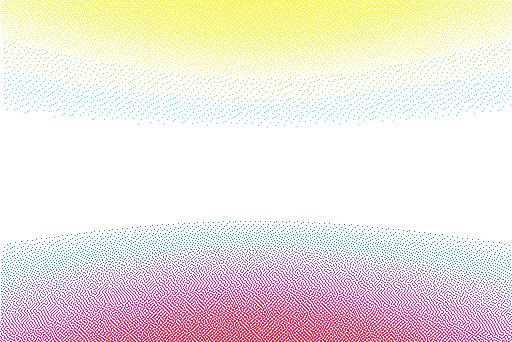

But it comes out looking like this:
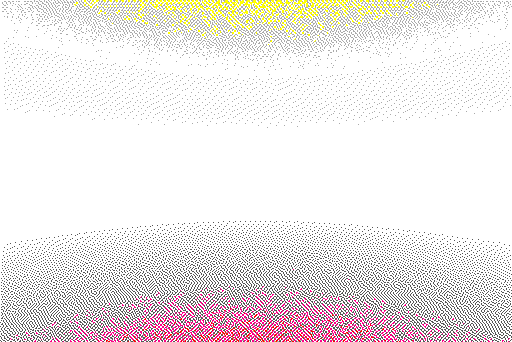

I used this palette hex:

000000
555555
FF0000
FF8800
FFFF00
88FF00
00FF00
00FF88
00FFFF
0088FF
0000FF
8800FF
FF00FF
FF0088
AAAAAA
FFFFFF

But it thinks that FF00FF is the default color and it doesn't see FFFFFF as the transparent. I got Color and Transparency styles on. Am I doing something wrong?

Edit: I was doing something wrong! I just needed to export the images as PNGs. The colors and transparency were correct.

Thank you for the optimization!

Unironically, I love it when, indeed, a program could be simplified further.

(4 edits)

Very much, thank you!

Though, now I have a new problem.

I got a canvas, a slider (Switch), and a field (Circle) with two images.

The Code for the canvas

on click pos do
 if me[pos] = colors.black
  Switch.value:Switch.value + 1
 end
end

And the Code for the slider

on change val do
 if Switch.value = 1
  canvas1.paste[Circle.images[1]]
 else
  canvas1.paste[Circle.images[0]]
 end
end

When a black pixel is clicked, it's supposed to change the value of Switch from 0 to 1 then paste the image of that value from Circle into canvas1. It does the second step, but not the third. And the slider works when clicking on it but not when changed by another widget.

Figured it out! Here's the code:

on drag pos do
val:Switch.value
 if (me[pos] = colors.black) & (Switch.value = 0)
  Switch.value:Switch.value + 1
 elseif (me[pos] = colors.black)
  Switch.value:Switch.value - 1
 end
 Switch.event["change" val] 
end

Is it possible to have the drag event on a canvas affect a certain area of that canvas? Say:

on drag pos rect[(1,1) (10,10)] do
 [script here]
end

or test if the pattern of a pixel in a canvas is a certain one to execute a script?

on drag pos do
 if pattern = 1
  [script here]
 end
end

That's awesome! I'll have to get my friends to play this.

I'm curious, how does the multiplayer work? Is it just a bunch of people on the same device? Either way, this game looks good.

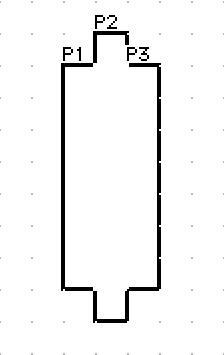
Hm... I have an idea. In that I could have a bunch of canvases, shaped into a rough hexagonal shape, which I will call the "Player," like this:

And then have different canvasses act as, I don't know, geometry for the Player to "collide" with. Like this:
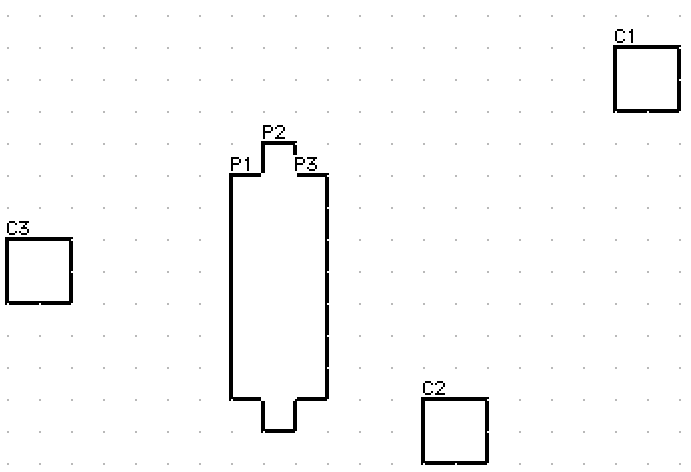

I theorize that I can use the Draggable module to collide with the other canvases.

Again, this is theory for me and probably labor intensive, but better than nothing, lol.

I want to make an isometric game in Decker. I'm able to make things move. But there are some places where I don't want to move beyond.

In other words, I want to have collision mechanics. How do I program that? I vaguely remember someone saying to use the Path module to text whether a patter is or is not to be moved into, but I don't know how that works. I tried looking into Sokoban, but I can't make heads nor tails of it and, after looking into its resources, cannot find anything on the mover module within it which might be able to help me, but I am not sure.

In all honesty, I don't even know where to start and could appreciate some pointers.

(1 edit)

Follow up question: How can I implement the windows and rtext? I see that it can help. but how do I format the script to actually replace multiple characters or individual words?

Do I use a code like this?

on change val do
 a1:2 window "thwhshqu"
 a2:1 window "tvzc"
 a1 dict a2
 II.text:rot13 @ I.text
end

Thank you!

on click do
 slider1.value:slider1.value - 1
 slider1.event.change[val]
end

I tried using this code to change the value of the slider and execute this script:

on change val do
 Sphere.paste[Assets.images[val]]
 if me.value = 0
    button1.show:"solid"
    button2.show:"solid"
 else
    button1.show:"none"
    button2.show:"none"
 end
end

There is a range from 0 to 4 for the images in a field going down. But, for some reason, the 0th image gets pasted and not the third in the field.

I want it to paste the images in the order of values in the slider with each click and not skip to zero.

Thank you.

I ended up using a field anyways, lol.

That said, I got a new question, how do I script a button to add or subtract from the existing value of the slider?

(1 edit)

I'm using a slider to switch between images that I want to copy from one set of canvases into a single canvas. I'm not using a ritch text field.

(1 edit)

I want to use a slider in X card to copy # canvas image in Y then paste it in X canvas. Here's the code:

on change val do
   if me.value = #
      X.paste[deck.Y.widget.#.copy[]]
   end
end

But it doesn't work when I chage the slider value. Am I doing something wrong?

Thank you!

How do I have a grid execute different scripts based on which row is clicked?

Thank you!

Thank you!

How do I delete cards?

How do I make a canvas move via arrow keys being pressed? Also, how do I go to another card when the canvas is in a certain position. Do I need a grid to be able to do both of these things?

Some questions I have about grids:
1. What are some ways that I could "lock," for lack of a better term, a column of a grid? I mean, I suspect I can use a format function to make it so that whenever a cell in that column gets changed to something else that it would replace the original letter, but I'm only half aware on how to pull that off and curious as to whether their exists a lock function for parts of a grid. But I digress.

2. Follow-up question to the first one, how would I rearrange the order of values in a column via button pressing? For example, changing the arrangement of values in a column, letters specifically, from alphabetical to by frequency, etc.

3. Is it possible to extract the values from a column in a grid and turn it into a string that can be used in dictionary functions?

Oh yeah! This really helps with single letter replacements and gives me something to play with for a good while.