Thanks! GameCheck doesn't use fixed screen coordinates for replay — it re-identifies the target UI element using a stable ID and fails safely if it can't resolve it. The graphics diff tolerance point is useful too.

ENJOYBASE
Creator of
Recent community posts
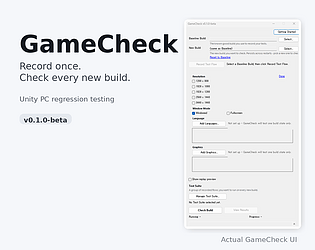
Hi, I'm working on GameCheck, a regression testing tool for Unity PC games.
The idea: record a gameplay or UI flow once, then replay it against new builds to automatically catch regressions across resolutions, window modes, languages, and graphics settings.
I'm running a free beta right now and looking for feedback on the first-use experience, specifically:
- Was setup clear?
- Did anything fail or behave unexpectedly?
- Was this more useful than your current way of testing builds?
- Would you use it again on a future build?
Official beta support currently covers Windows Unity projects using uGUI.
No need for a full review — even a quick 5-10 minute test and a note on where you got stuck would really help.
Project page: https://enjoybase.itch.io/gamecheck
Good catch — DPR/display scaling isn't a first-class axis in what we record today.
Right now, Record captures the in-game screen size/resolution, and Replay tests different pixel resolutions by driving the RenderTexture directly (1280x800, 1920x1080, 1920x1200, 3440x1440, etc.).
What we don't currently capture or replay is Windows display scaling (125%/150%) or a DPR-equivalent value as part of the environment. So while we can compare behavior across different pixel resolutions, a same-resolution/different-scale issue is a real gap today, as you said.
I like your framing of Resolution and Display Scale as two separate test axes rather than grouping everything under "DPI issues." A matrix like 1920x1080 @ 100% / 125% / 150% makes sense as an orthogonal dimension on top of the resolution testing we already do.
Since GameCheck is Unity/native-first, the mechanics are different from the browser case you described, but the core point absolutely carries over: resolution and scale can produce different classes of failures and should probably be tested separately.
Adding this to the roadmap as a gap worth solving, not just a nice-to-have. Appreciate the detailed breakdown — genuinely useful way to think about it.
Thanks, that’s really helpful. The “test the extremes manually” workflow is exactly what I was curious about.
I agree that subjective UX is difficult to automate. What I’m experimenting with is a bit different — rather than trying to decide whether the UX is “good,” it records a test flow once, replays the same flow at several resolutions, and looks for visual/layout regressions or unexpected differences for a human to review.
Would something like that actually save you time, or would you still prefer checking the extreme resolutions manually?
I’ve been working on a Unity project and found testing the same flow across different resolutions pretty tedious.
I’m experimenting with a tool that lets you record a test once, then replay the same actions at different resolutions to catch UI/layout issues.
For example: record at 1920x1080, then automatically replay at 1920x1200, 1280x800, 3440x1440, etc.
I’m curious how other developers handle this right now. Do you test resolutions manually, use automated tests, or mostly just check a few common sizes?
Would something like “record once, test across resolutions” actually be useful in your workflow?
