On Sale: GamesAssetsToolsTabletopComics
Indie game storeFree gamesFun gamesHorror games
Game developmentAssetsComics
SalesBundles
Jobs
TagsGame Engines

7-WaysStudio

9
Posts
31
Followers
A member registered Apr 12, 2023 · View creator page →

Creator of

Recent community posts

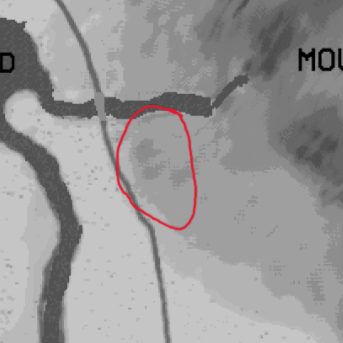
rocks and campfires spawn completely randomly. rocks are always on trails, campfires are a bit off from trails. theres a chance one of them can spawn by the waterfall below the mountain, which might be the one you're trying to find. if it isnt there, then i honestly dont know

dont think so, i dont really have that much money

yes, the crash is intentional

Which UI? Is it the frame on the edge? (if it is the frame you are looking for, its either "frame_thin" or "frame_thick" in Main)

Its not CC0, but is quite similar, in the README file theres licensing info, that says that you can use it wherever you want (commercial and non-commercial use allowed), just that you cant redistribute it or sell it as your own.

(1 edit)

I dont use UE5 myself, but you should be able to:

 (1) drag and drop the .PNG files into the Content Browser, or press an import button to select it in your file explorer. 

(2) UE5 should import them as Texture2D, 

(3) then to make it possible to place it on UI images, you create a Widget Blueprint (right click content browser -> User Interface -> Widget Blueprint -> User Widget). 

(4) Inside the blueprint, you add an Image component and assign the imported PNG textures to its image brush. 

(5) Then place the widget on the screen (via Create Widget + Add to Viewport or via UMG HUD) to see it in game.