

Hey man, please add the option to edit player 1—why did you remove it?
13 days ago(+2)
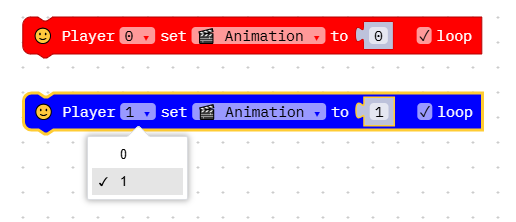
The method for assigning an animation to Player 0 or Player 1 has changed. There is a single sprite editor for both players. For example, suppose you have created two animations: number 0 for Player 0 and number 1 for Player 1. Use the "Player set" block to assign an animation to a player. When you assign an animation to Player 1, the block changes color to blue. I hope this is clear and that it has been helpful to you.
13 days ago(+1)
I should start by saying that I’m not the best person to help you, and the method I’m about to explain might not be the best one.
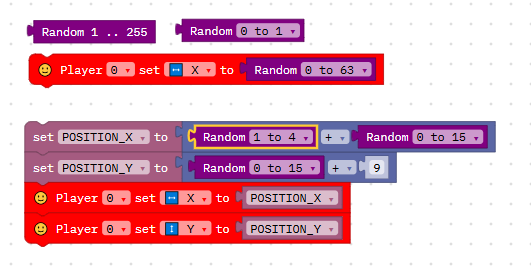
Random blocks generate a random number. You can use these blocks individually or combine them with mathematical operations to achieve specific results.
12 days ago(+1)
No, please feel free to ask. I’m happy to answer if I can. I’m not very good with English, so perhaps I didn’t express myself well. What I mean is that I’m not an expert, and my answers are based solely on my own experience—gained through trial and error. For this reason, my answers might not be the best ones.
12 days ago(+1)
If you want to see a good game made with VCS Game Maker https://virtualjames.itch.io/ghost-crypt
12 days ago(+1)
I invite you to visit the page featuring my games and try out the demos for free, right in your browser; if you happen to like any of the game mechanics, I’d be happy to explain how I created them.