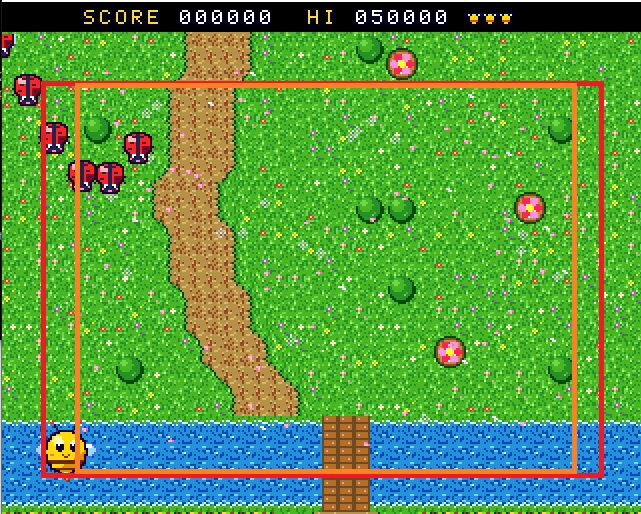
nice and addictive .. under Cspect is playfield smaller than a whole visible screen ??
27 days ago(+1)
Hi, I'm not sure it affects gameplay, I am enjoying it and think its lots of fun, so can't be affecting my thoughts on the game. I did think it was strange when I first realised it but wasn't sure is this was as it was meant to be. So just passed on the info about Zed-next after seeing the comment from mance.
Claude said….
Your player has a point, and I think it's worth fixing.
Here's why it happens. The game's logic works in a 256-pixel-wide space: enemy flight paths, bullets, the bosses (drawn on the 256-wide Layer 2) and the bee's movement limits all use it. The screen is 320 pixels wide, so there's a 32-pixel strip on each side that the bee can't enter. That's a fifth of the width. Before v1.7 it didn't stand out, because the play area looked boxed in anyway. Since v1.7 the ground scrolls edge to edge, so those strips look like playfield, and hitting an invisible wall there feels like a bug rather than a design choice. In the arcade TwinBee you can fly right to the edges, so most players will expect that.
The catch is balance. If the bee can reach the edges but enemies and bullets don't, the edges become safe spots where you can sit and dodge everything. So there are two honest ways to fix it.
Open it up (my recommendation). Let the bee fly to within a few pixels of each edge. Then make sure the edges aren't free:
- aimed bullets already track the bee wherever it is;
- I'd widen a few enemy paths, mirroring some of the swoops so they cover the outer strips;
- bells and power-ups would be allowed to drift wider too, so collecting them there feels natural.
It's a moderate change, because the bee's position has to move from the 256-wide range to the 320-wide one: shots, collisions, Options and the ice sliding in World 5 all use it. It's well within reach, and I can test it in all five worlds and on the bosses.
Make the edge look intentional. Keep the play area as it is, but mark the side strips visually, for example with darker, framed or hatched edge columns. That way the boundary reads as a wall rather than an invisible barrier. It's cheap and changes nothing about balance, but it gives back some of the full-screen feel v1.7 was going for.
I'd go with the first option. The game will feel more like TwinBee and less cramped, and the balance risk can be managed. Shall I build it as v1.8?
Nothing serious... It was just that the game was running in a window about 256 pixels wide, but the graphics were displayed at 320 pixels wide, so it looked like there was an invisible barrier separating them from the game...
Even those flower petals—or whatever they are—that scroll in parallax don't appear across the entire width of the game window.
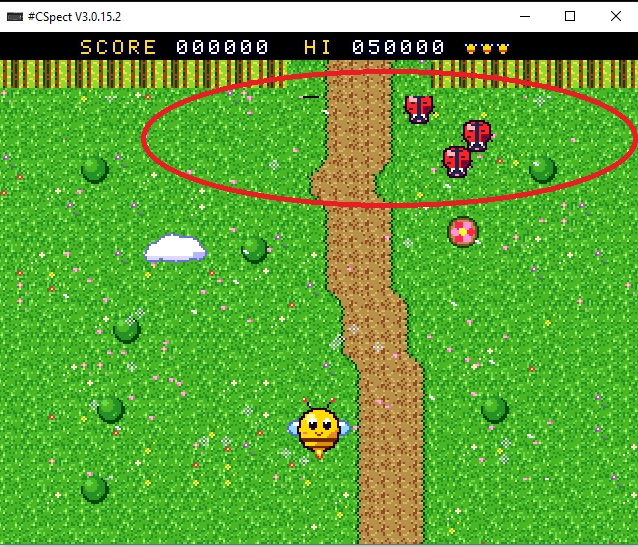 For me, it's still the same even in version 1.8—which means the graphics scroll within a 320x256 window (I think), but the game runs at 256x192 (I guess) ... That means that when an enemy flies down at me from above, it doesn’t appear right at the very edge of the visible game screen, but about 32 pixels or so further away from it, and this applies to all four sides.
You know the legacy Speccy. The screen has a wide BORDER where no graphics are displayed. The game runs “in the center,” and the border is all around it. In your game, there are scrolling graphics in the border, but neither the player nor the NPCs can get there.
25 days ago(+1)
I will apply this fix on Wednesday when my Claude tokens refresh since I burned through my usage on 2 x new games I have one the go!
We need to fix an architectural coordinate mismatch in BeeNext.
As shown in our recent test builds and screenshots, the Layer 2 background art, tilemap, and copper effects render correctly across the full 320x256 screen. However, the game logic, enemy spawn paths, player movement bounds, and collision checks are still trapped inside a centered 256x192 logical box. This creates an unwanted 32-pixel dead-zone border on all four sides where enemies spawn late, bullets stop short, and the player cannot reach.
I need you to refactor the game engine to run natively across the full 320x256 display space (accounting for the top score HUD). Here is the technical roadmap to fix this once and for all:
1. Expand the Core Coordinate System:
- Shift the internal playfield coordinate bounds from the legacy 256x192 limits out to full 320x256 resolution.
- Adjust the coordinate offset mapping so that logical (0,0) aligns with the top-left of the physical 320x256 screen (minus the top status bar height).
2. Update Player & Entity Boundaries:
- Recalculate player movement clamping so the bee can travel right out to the true edges of the 320-pixel width and 256-pixel height (leaving just a safe 8-16px sprite clipping buffer so hardware sprites don't half-cut off).
- Update all enemy spawn vectors and entry coordinates so that enemies originate from off-screen or the absolute outer boundaries of the 320x256 window rather than popping in 32 pixels inward.
- Ensure all bullets, bombs, options, and pickups map correctly to this expanded coordinate grid.
3. Hardware Sprite & Display Registers:
- Audit and update any Next hardware sprite clipping or display window registers (NextRegs) to ensure hardware sprites are fully permitted to roam and render out in the outer 32-pixel margins without being artificially clipped.
Let's trace through our movement limits, boundary constants, entity spawn routines, and hardware register configurations to implement a true edge-to-edge 320x256 build.